 RestocksAIO Docs
Entry Certificate
Generate Entry Certificates (Gelangensbestätigung) for intra-Community supplies within the EU.
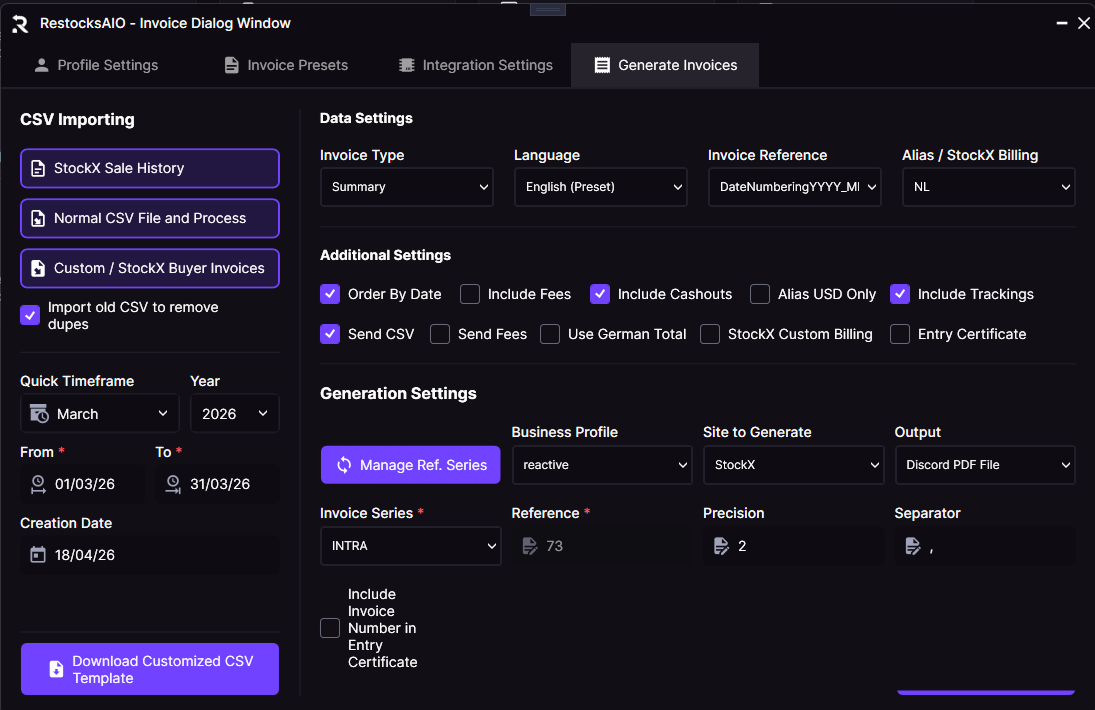
Enable the Entry Certificate checkbox under Additional Settings in the Generate Invoices tab to include the Gelangensbestätigung PDF alongside your invoices.
What is an Entry Certificate?
An Entry Certificate (German: Gelangensbestätigung) is an official document that German tax authorities require. It proves that goods were delivered to another EU Member State as part of an intra-Community supply. VAT-exempt B2B transactions within the European Union need this document.
Platforms like StockX receive goods in another EU country (e.g., Netherlands). When you sell items to them, you need this certificate to prove that the goods crossed borders and qualify for VAT exemption under EU tax law.
The Entry Certificate matters most for German sellers who ship to StockX's Netherlands authentication center. It is proof that goods left Germany and entered another EU Member State.
Why Do You Need It?
- VAT Compliance: Required to claim VAT exemption on intra-Community supplies
- Tax Audit Protection: Provides documentation if questioned by tax authorities
- Legal Requirement: Mandatory under German tax law (§17a UStDV) for B2B EU transactions
- Professional Record-Keeping: Keeps organized records of your cross-border sales
What's Included in the Certificate?
The Entry Certificate generated by RestocksAIO includes:
First Page (Certification)
| Section | Description |
|---|---|
| Supplier Information | Your business name, address, and VAT ID |
| Customer Information | StockX's EU address and VAT ID (Netherlands) |
| Certification Statement | Official declaration of goods receipt |
| Quantity | Total number of items supplied |
| Commercial Description | Product categories (e.g., Sneakers, Slides) |
| Month/Year of Receipt | When goods were received |
| Month/Year Transport Ended | When transportation was completed |
| Place of Entry | EU Member State where goods arrived |
| Date & Signature Fields | For official signing |
Attachment Pages (Itemized List)
A detailed table in landscape format listing every item:
- Line number
- Invoice number
- Order ID
- Product name
- SKU/Style code
- Size
- Delivery date
- Ship from/to countries
- Tracking number
How to Generate an Entry Certificate
Generation is optional. RestocksAIO generates the Entry Certificate with your invoices only when you enable the Entry Certificate checkbox in the Generate Invoices function. The app saves your choice.
Steps:
- Go to Features → Generate Invoices
- Select your sales for the period you want to document
- Set your invoice settings as usual
- Under Additional Settings, enable the Entry Certificate checkbox
- Click Generate
- The Entry Certificate is created and sent to your Discord webhook with your invoices
Optional generation: Enable the Entry Certificate checkbox to get the certificate. With the checkbox enabled, RestocksAIO generates it when you create invoices for StockX sales that involve intra-Community supplies. The app saves your choice for the next run.
Output
The Entry Certificate is delivered as a PDF file named:
Entry_Certificate_YYYY-MM.pdfYYYY-MM is the month and year of the invoice period (e.g., Entry_Certificate_2025-01.pdf).
Requirements
To generate Entry Certificates, make sure you have:
- ✅ A complete Invoice Profile with your business details and VAT ID
- ✅ Discord webhook set up to receive documents
- ✅ Sales data from platforms with EU delivery addresses (e.g., StockX)
- ✅ The Entry Certificate checkbox enabled in the Generate Invoices tab
Example Use Case
Scenario: You're a German reseller who sold 50 pairs of sneakers to StockX in January 2025. All items were shipped to StockX's authentication center in Veldhoven, Netherlands.
Result: When you generate your January invoices with the Entry Certificate checkbox enabled, RestocksAIO creates an Entry Certificate that:
- Lists you as the supplier with your German VAT ID
- Lists StockX Netherlands as the customer with their Dutch VAT ID
- Contains all 50 items with their individual details
- Provides the official certification text required by German tax law
You can archive this document and show it to tax authorities if you need to prove your VAT-exempt intra-Community supplies.
Important: Always ask a tax professional about your own VAT obligations. The Entry Certificate helps you comply with regulations, but tax requirements may vary with your situation.