 RestocksAIO Docs
Webhook API
Configure outbound webhook notifications to your own endpoint (Premium/Lifetime).
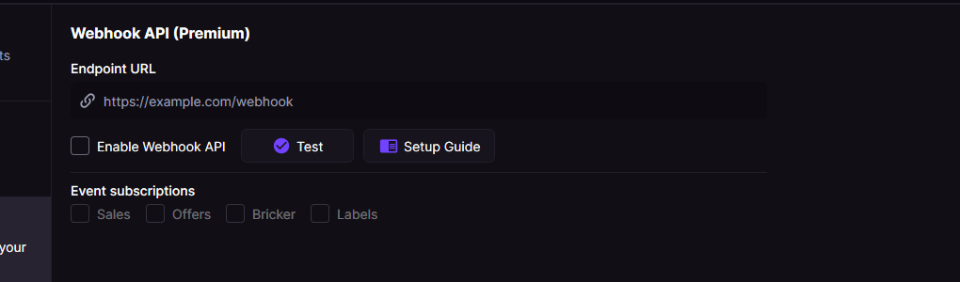
The Webhook API panel lets you point at your own HTTPS endpoint and toggle per-event subscriptions (Sales, Offers, Bricker, Labels).
Premium/Lifetime users can send real-time JSON notifications from RestocksAIO to their own HTTPS endpoint. You can pick which event types to send.
For a high-level overview, see the Webhook API feature page on restock.gg.
Want to sync a marketplace we don't support (eBay, Vinted, …)? The webhook is your escape hatch. When a pair sells on a supported platform, RestocksAIO POSTs a sale.detected event to your endpoint — your own code can then end the matching listing on eBay, Vinted or anywhere else, so you never oversell. See Use case: DIY eBay / Vinted sync below, or the full walkthrough: Build your own eBay & Vinted sync with the Webhook API.
Enable
- Open Settings → Webhook API (Premium).
- Enter your HTTPS endpoint.
- Toggle Enable Webhook API and enable the event types you want.
Payload
{
  "event": "event.name",
  "timestampUtc": "2025-01-01T12:00:00Z",
  "data": { /* event-specific fields */ },
  "meta": {
    "appVersion": "3.x",
    "subscription": "Premium|Lifetime",
    "username": "your-login"
  }
}
Events
| Event | When it fires | data fields (type) |
|---|---|---|
sale.detected | New sale or status change | saleId (string), saleName (string), sku (string), site (string), size (string), payout (string), status (string) |
offer.detected | Offer detected | productName (string), sku (string), site (string), size (string), sizeRegion (string), itemId (string), offerAmount (number), offerPayout (number), profitIfAccepted (string), currency (string) |
bricker.price_change | Bricker raises/lowers price | taskId (string), site (string), size (string), oldStorePrice (string), newStorePrice (string), currency (string), reason (string) |
bricker.item_sold | Bricker item sold | taskId (string), site (string), size (string), size_eu (string, optional), size_us (string, optional), size_uk (string, optional), sku (string), orderId (string), storePrice (number), sitePayout (number), sitePayoutAfterFees (number), currency (string), isConsign (boolean) |
bricker.item_deleted | Item deletion attempt | status (string: success/failure), sellingSite (string), productName (string), styleCode (string), size (string), sneakerId (string) |
sale.detected example
{
  "event": "sale.detected",
  "timestampUtc": "2025-01-01T12:00:00Z",
  "data": {
    "saleId": "12345",
    "saleName": "Jordan 1 Retro",
    "sku": "555088-105",
    "site": "StockX",
    "size": "10",
    "payout": 245.50,
    "status": "Detected a new sale!"
  },
  "meta": {
    "appVersion": "3.x",
    "subscription": "Premium|Lifetime",
    "username": "your-login"
  }
}
offer.detected example
{
  "event": "offer.detected",
  "timestampUtc": "2025-01-01T12:00:00Z",
  "data": {
    "productName": "Jordan 4 SB Pine Green",
    "sku": "DR5415-103",
    "site": "Wethenew",
    "size": "10",
    "sizeRegion": "EU",
    "itemId": "987654",
    "offerAmount": 320.0,
    "offerPayout": 300.0,
    "profitIfAccepted": "+45.00",
    "currency": "EUR"
  },
  "meta": {
    "appVersion": "3.x",
    "subscription": "Premium|Lifetime",
    "username": "your-login"
  }
}
bricker.price_change example
{
  "event": "bricker.price_change",
  "timestampUtc": "2025-01-01T12:00:00Z",
  "data": {
    "taskId": "BRK-001",
    "site": "StockX",
    "size": "9.5",
    "oldStorePrice": "250.00",
    "newStorePrice": "242.50",
    "currency": "EUR",
    "reason": "We lowered the price of your sneaker!"
  },
  "meta": {
    "appVersion": "3.x",
    "subscription": "Premium|Lifetime",
    "username": "your-login"
  }
}
bricker.item_sold example
{
  "event": "bricker.item_sold",
  "timestampUtc": "2025-01-01T12:00:00Z",
  "data": {
    "taskId": "BRK-002",
    "site": "Alias",
    "size": "10",
    "size_eu": "44",
    "size_us": "10",
    "size_uk": "9",
    "sku": "DD1391-100",
    "orderId": "ALIAS-7788",
    "storePrice": 180.0,
    "sitePayout": 190.5,
    "sitePayoutAfterFees": 185.0,
    "currency": "EUR",
    "isConsign": false
  },
  "meta": {
    "appVersion": "3.x",
    "subscription": "Premium|Lifetime",
    "username": "your-login"
  }
}
bricker.item_deleted example
{
  "event": "bricker.item_deleted",
  "timestampUtc": "2025-01-01T12:00:00Z",
  "data": {
    "status": "success",
    "sellingSite": "StockX",
    "productName": "Jordan 1 Retro",
    "styleCode": "555088-105",
    "size": "10",
    "sneakerId": "12345"
  },
  "meta": {
    "appVersion": "3.x",
    "subscription": "Premium|Lifetime",
    "username": "your-login"
  }
}
Use case: DIY eBay / Vinted sync
RestocksAIO drives 10+ marketplaces natively, but eBay and Vinted are not among them — there is no first-party integration that reads or writes those accounts. Many resellers still cross-list the same stock there, which risks overselling when a pair sells on a supported platform but stays live on eBay/Vinted.
The Webhook API closes that gap without us building an integration: it turns "a sale happened" into an HTTP POST to an endpoint you control, and your code does the platform-specific work.
The flow
- Enable the Sales event and point the Webhook API at your HTTPS endpoint (a small always-on server — a VPS under €10/month works well;
localhostbehind a tunnel like Cloudflare Tunnel or ngrok is fine for testing). - On each
sale.detected, readdata.sku(style code) anddata.size— your join key across every platform. - Look those up in your own
sku + size → listing IDmap and end the matching listing on the other platform.
app.post('/restocks-webhook', (req, res) => {
  const { event, data } = req.body;
  if (event === 'sale.detected') {
    // your code: end the matching eBay / Vinted listing by SKU + size
    delistEverywhereElse(data.sku, data.size, data.site);
  }
  res.sendStatus(200); // ack fast, do the API calls async
});
Honest limits
- eBay has official APIs for ending a listing or zeroing its quantity — a supported path.
- Vinted has no official public API. Any Vinted automation is unofficial and yours to maintain; many resellers automate eBay and treat Vinted as notify-and-remove-manually (the webhook still tells them the instant it sold).
- This bridge is one-way: a sale that happens on eBay/Vinted never reaches RestocksAIO.
- RestocksAIO supports the webhook (event delivery). The downstream eBay/Vinted code is your DIY integration — not covered by support.
Production notes: de-duplicate on saleId (delivery is at-least-once), verify the signed request before acting, and return 200 immediately while doing the API calls in the background.
For the full walkthrough with payload breakdowns and the other events you can hang logic on (bricker.item_sold, bricker.item_deleted, offer.detected, bricker.price_change), see Build your own eBay & Vinted sync with the Webhook API.