 RestocksAIO Docs
Bricker Recommendations
Get AI-powered recommendations to optimize your Bricker Mode controller payout filters.
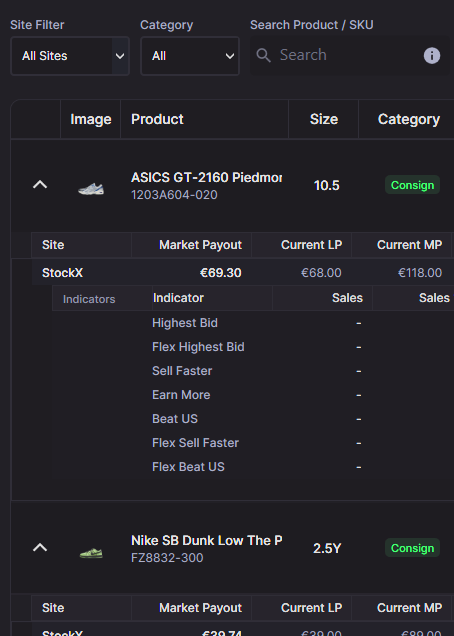
Bricker Recommendations shows controller-level LP/MP suggestions with expandable per-site and per-indicator detail rows.
The Bricker Recommendations window suggests LP/MP filters for each controller and each site, so you can tighten them quickly. It bases the suggestions on live task payouts and monitor indicators.
Where to open it
Open Bricker Recommendations from the Bricker Mode view. It lists your active controllers. You can apply changes in bulk or per site without leaving the window.
What you see in the window
Toolbar filters and actions
- Site Filter: Limit the grid to a single marketplace.
- Only Above Market: Show controllers priced above market.
- Hide Increase Recommendations: Hide rows where the suggestion is to raise prices.
- Show analyzed only: After running indicator analysis, hide sites without indicator data.
- Analyze Indicators: Pulls per-site indicators and fills the nested “Indicators” table.
- Refresh: Reloads recommendations with the latest data.
Controller rows (top grid)
- Image / Product / SKU / Size
- Consign / Resale badge
- Sites: Count of active marketplaces for the controller.
- Current LP / MP: Current filters (blended across sites).
- Market Payout: Blended market payout estimate.
- Suggested LP / MP: Rounded suggestions based on market data.
- Difference %: Suggested change vs current LP.
- Actions:
Apply All(applies to all active sites on that controller) andFocus(jumps to the controller in Bricker Mode).
Per-site rows (nested list)
- Market Payout / Current LP / Current MP / Suggested LP / Suggested MP / Difference %
- Reasoning: Site-specific explanation.
- Action:
Apply(switches toAcceptedafter success).
Indicator rows (shown after Analyze Indicators)
- Sales count, Sales %, Ask %, Avg Payout, Avg Price
- Suggested LP / MP per indicator
- Quick apply button per indicator
How recommendations are calculated (short version)
- The tool uses recent task payouts plus monitor indicators. Old or noisy points count less or are ignored.
- Per-site market payout is blended. Controller-level values are the average of the per-site results.
- Suggestions are for meaningful changes, not tiny ones. “Hide Increase Recommendations” can hide price-raise suggestions.
Applying recommendations
Apply All updates every active site for that controller. Use the per-site Apply buttons when you only want to change a specific marketplace. After you apply, the button switches to Accepted and the values refresh.
To review a controller in more detail, use Focus. It returns you to Bricker Mode with the controller highlighted.
Filtering and sorting tips
- Click column headers to sort.
- Combine Site Filter with Only Above Market to find overpriced controllers fast.
- Use Hide Increase Recommendations to see only reductions.
- Run Analyze Indicators, then toggle Show analyzed only to check sites with indicator data.
Troubleshooting
- Empty table: Make sure you have active controllers and recent monitor/task data.
- Indicator rows hidden: Run Analyze Indicators, then toggle Show analyzed only off/on.
- Apply disabled: The row shows
Acceptedafter a successful apply. Refresh to recalculate if needed. - Recommendations look off: Check the reasoning text. If the data looks inconsistent, refresh or check the monitor feeds.