 RestocksAIO Docs
Market Data
Read marketplace asks and payouts inside RestocksAIO before you price a pair. The figures are the ones the connected account can see. Use the size you hold.
The Market panel shows prices of the product that you are about to publish. It has two parts: the active eBay listings, and the Vinted sold prices that RestocksAIO follows for you. The panel only reads. It writes nothing to eBay or Vinted.
The Market panel is part of the Publish Composer. Premium includes the Publish Composer. It is in the macOS app and the new Windows app.
Open the panel
- Open the Publish Composer.
- Select an offer.
- Click Market in the toolbar.
The panel shows the brand, the model, the style code and the size of the offer.
eBay · active listings
RestocksAIO searches the active fixed-price listings on eBay. It does not use your eBay account for this search. Auction bids are not prices, so RestocksAIO leaves auctions out.
- RestocksAIO searches by style code. If the style code is shorter than 5 characters, it searches by brand and model.
- When eBay knows the size of the offer, RestocksAIO also filters by that size. If no listing has that size, the panel shows all sizes and says so.
- Each price is the item price plus shipping.
- RestocksAIO removes outliers before the statistics. The Count column shows how many it removed, for example "42 (−3)".
The eBay sites are the sites of the eBay channels of the offer. Without eBay channels, RestocksAIO uses the sites of your eBay accounts. Without eBay accounts, it uses eBay Spain.
For each eBay site, the panel shows three rows: all, new and used. Each row shows Count, Min, Median, Average and Max.
A note under a row can show:
- All sizes: the search did not filter by size.
- … without shipping cost: these listings count with the item price only.
- … in other currencies left out: these listings are not in the statistics.
RestocksAIO keeps each eBay result for 4 hours.
This panel shows active eBay listings only. Market Compare reads eBay sold prices. See eBay sold prices.
Vinted · sold
Vinted shows no archive of sold items. RestocksAIO follows a Vinted search for you and records the items that sell.
- In the Market panel, tick Track on Vinted.
- RestocksAIO starts the first read at once.
How the tracking works:
- About every 6 hours, RestocksAIO reads the 50 newest results of the search, as a visitor.
- It does not use your Vinted account or its session.
- It records the id, the price and the first-seen time of each item.
- When an item leaves the results, RestocksAIO reads the item page. A sold or closed item counts as a sale.
- An item that is active, removed or hidden leaves the tracking. It does not count as a sale.
- A reserved item that stays out of the results for 7 days leaves the tracking.
The tracking runs while the app runs. Nothing is written to Vinted.
The Vinted site is the site of the Vinted account of the offer. Without one, RestocksAIO uses your first Vinted account, else www.vinted.es.
The panel shows:
- the number of sales and the median price of the last 30 days and of the last 90 days.
- the number of listings that RestocksAIO follows.
- the time of the last read.
- the recent sales, with the date of the sale, the price and the date of the listing.
Vinted shows no final sale price. The price of a sale is the last listing price that the search showed. The buyer can have paid less after an offer.
To stop, clear Track on Vinted. RestocksAIO then deletes the sold history of that product.
Limits
| Limit | Value |
|---|---|
| Tracked products for each Vinted site | 20 |
| Results read for each search | 50 newest |
| Time between two reads of one search | About 6 hours |
| Sold history | 90 days |
| eBay result kept in the app | 4 hours |
| eBay sold prices kept in the app | 6 hours |
| eBay sold prices period | 90 days |
Messages
| Message | What to do |
|---|---|
| This product has no style code, brand or model to search on eBay. | Add the style code, or the brand and model, to the product. |
| No active fixed-price eBay listings for this product. | eBay has no fixed-price listing of this product now. |
| This product has no brand or model to search on Vinted. | Add the brand or the model to the product. |
| … already tracks 20 products. Stop one first. | Clear Track on Vinted on another product first. |
Compare evidence and prices
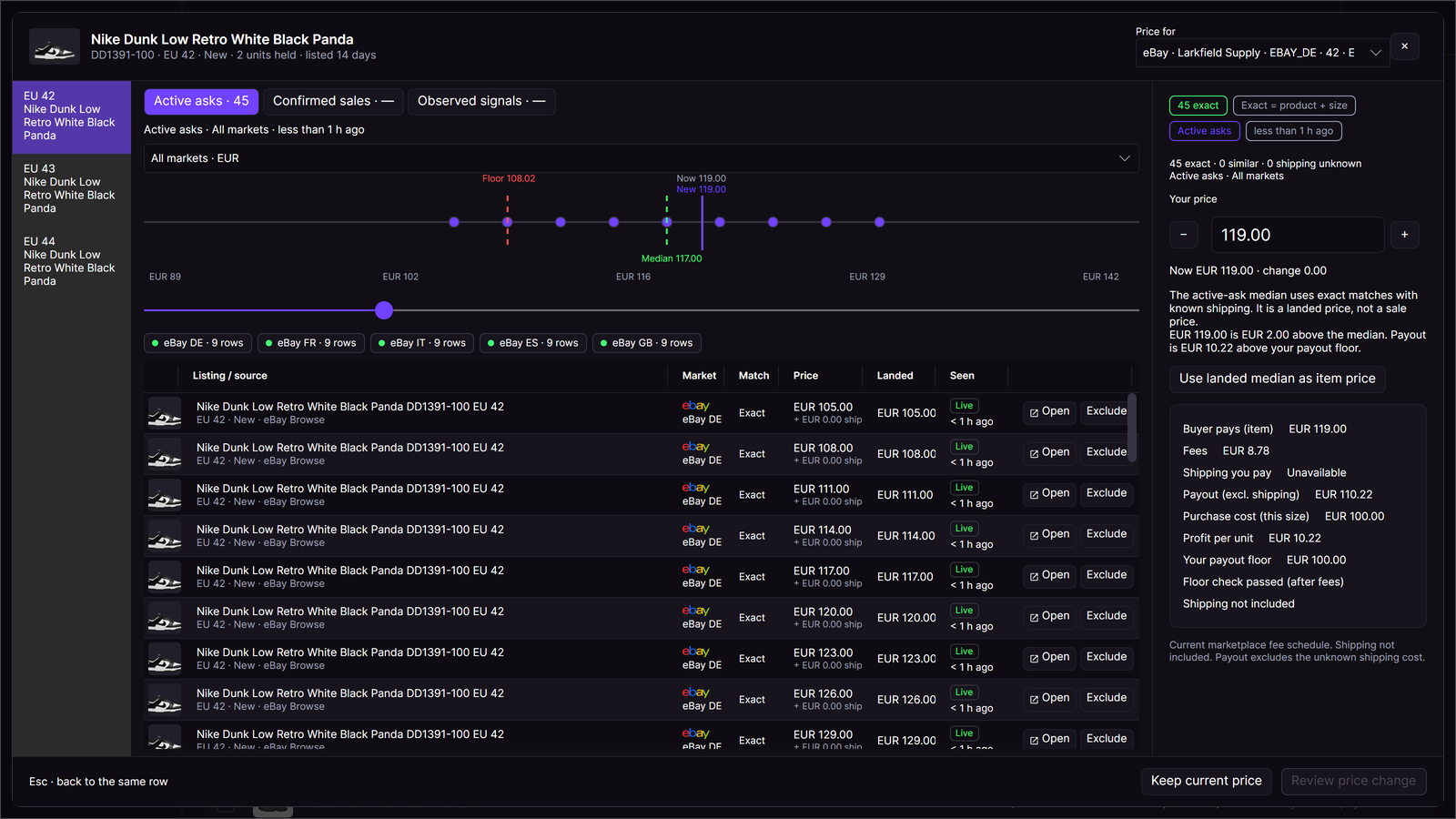
The shared comparison list shows the source state and a link to each result. Sample data.
Availability: New comparison features are available from version 0.4.41.56. Update the app if you do not see these controls.
Market Compare opens in a larger view with Your price set to your own price. It searches the main European eBay sites: DE, FR, IT, ES and UK. Broader product searches find more listings of the same product. Your own store sales also appear as evidence. Each row has an item photo and an Open button. Open is unavailable when the source has no link. Each source loads independently and shows its own state, such as loading, done, cached, failed or sign in to eBay. Every tab uses the same comparison list.
- Open Compare for the item.
- Select the destination under Price for.
- Choose Active asks, Confirmed sales, or Observed signals.
- Check the match, condition, currency, market, and source date.
- Set Your price.
- Select Review price change.
Compare prefers active asks for the destination. Exact matches require product, size, and condition evidence. Observed signals do not prove a completed sale. An unavailable read does not mean that the market has no offers. Use Retry after a failed read. Use Reconnect when the account session expires. Saved rows can remain visible after a session expires.
eBay sold prices
Availability: eBay sold prices are available from version 0.4.41.63.
The Confirmed sales tab has a source line eBay sold prices. eBay does not give sold prices through its API. RestocksAIO reads them from Seller Hub Product Research with your own eBay sign-in.
- Open Compare for the item.
- Choose Confirmed sales.
- Click the line eBay sold prices · sign in to eBay. eBay opens in a browser window.
- Sign in to eBay. You do this one time.
RestocksAIO checks the sign-in with one Product Research read. The line changes within about 5 seconds after you sign in. This also works when you close the window right after the sign-in.
When eBay does not confirm the sign-in, the eBay sold prices line says why, for example "The eBay sign-in took longer than 5 minutes. Click to sign in again." Click the line to sign in again.
After the sign-in, RestocksAIO searches the sold listings of the style code of the product in the last 90 days. It searches the eBay site of your account and the main European sites: DE, FR, IT, ES and UK.
- Each row shows the title, the average sold price, the shipping, the date of the last sale and a link.
- RestocksAIO keeps each result for 6 hours.
- A sold listing does not show its condition (new or used). These rows show as similar rows. They do not change the suggested price.
- Your own recorded sales and the sales that you add also show in Confirmed sales.
To add a sale yourself, use Open Product Research, then Add a sale you checked. Price rules never use a sale that you add this way automatically.
Only applicable minimum net payout rules set the Compare floor. Unit cost alone does not set this floor. A missing floor does not block a manual price. Check the below-cost and unknown-shipping warnings before you confirm. Keep current price leaves the price unchanged.