 RestocksAIO Docs
LimitedResell Sniper
Set up automatic offer acceptance for profitable deals on LimitedResell.
The LimitedResell Sniper accepts LimitedResell offers for you when they reach your payout. It is built into Bricker Mode and works with a standard Bricker Task.
How does it work?
Create and run a Bricker Mode task for LimitedResell as you do for every other site. The sniper does the rest.
- The bot monitors your pending offers on LimitedResell.
- If an offer's payout matches or exceeds your Lowest Payout Possible (LP), the bot accepts it instantly.
- The bot automatically refuses offers below your LP.
- Your Discord webhook notifies you about accepted, refused, and failed offers.
VAT Configuration
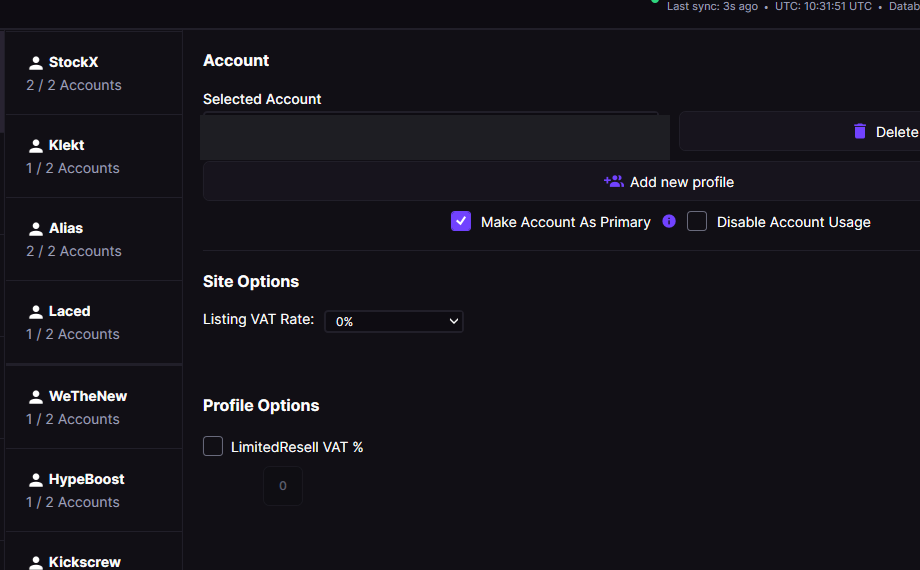
Set the Listing VAT Rate under the LimitedResell account's Site Options to match your actual LimitedResell VAT mode.
LimitedResell has three VAT modes that affect payout calculations. Set the mode per account in Settings > Accounts > Site Options:
- Marge — Margin scheme (default), no VAT added to payouts.
- 0% — Zero-rated VAT.
- 20% — Standard 20% VAT applied.
Make sure your VAT type matches your actual LimitedResell account settings. If it does not, payout calculations in Bricker Mode and the Price Comparator are wrong.