 RestocksAIO Docs
USS (Scanuss) Package Scanning
Submit your UPS labels to USS (Scanuss) for package-scanning verification.
USS (provided by LIMITED STORE, s.r.o. at scanuss.com) is an external package-scanning service built into the Label Dialog. After you generate a UPS label, you can send it to USS. USS then sends the shipment's scan signal to the carrier for you.
What is a USS scan?
When you sell on platforms like StockX or Alias, you usually have 2 business days to ship before your order is flagged as late. USS extends that window to 5–7 business days. It registers your UPS label with the carrier before you physically dispatch the parcel.
- How it works — USS sends a data signal tied to your label to the carrier's system. The platform reads the signal as confirmation that your shipment is moving.
- What you gain — extra time to consolidate orders, source inventory, or arrange logistics without triggering a late-shipment penalty on your seller account.
- What it is not — a substitute for shipping. You must still physically dispatch the parcel within the deadline that follows the scan (see Shipping deadlines below).
Where it lives in the tool
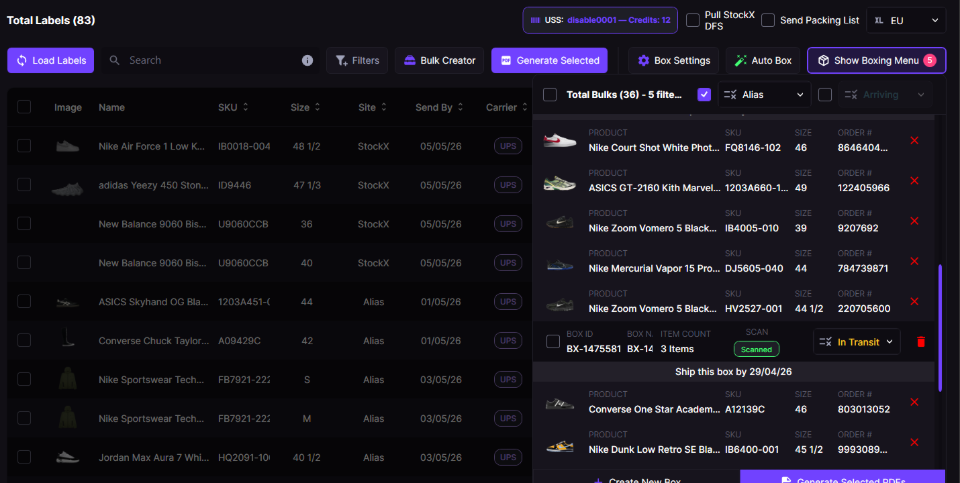
The Label Dialog with the USS integration. The USS pill in the top toolbar shows link state and credit balance. Each row has a Scan pill column. The Bulk Boxes panel has per-box Send to USS / Scanned indicators.
The integration adds three things to the Label Dialog:
- A USS header pill at the top of the right panel that shows your link state and remaining credits.
- A Scan column on each row, with a USS status pill for each label.
- New context-menu actions (right-click a row): Send to USS, Refresh USS status, Open USS dashboard.
USS is a third-party service with its own Terms and Conditions. If you use the integration, you agree to those terms. Most importantly, you agree that you physically possess the shipment at the moment of scanning and will dispatch it within the deadline (see Shipping deadlines below).
Linking your account
USS is tied to your Discord account. Before you can submit any label you need to link RestocksAIO to USS.
- Open the Label Dialog and look at the top of the right-hand panel. The strip labelled USS: with a
—balance is where you start. - Click the strip. Because you are not yet linked, the tool opens the USS Discord OAuth page in your default browser.
- Authorize with the same Discord account you use to log in to RestocksAIO. USS sends a callback to the tool when the OAuth flow completes.
- After you are linked, the header pill shows your credit balance. Click it again to refresh the balance.
USS uses your RestocksAIO Discord UID as the account identifier. This is the same account you log in with. There is no separate username/password.
If the link callback does not arrive (firewall, browser hijack, etc.), close and reopen the Label Dialog after you authorize. The tool reads the linked state on the next session refresh.
Eligibility
A row can be sent to USS only when both of these are true:
- Carrier is UPS — USS only handles UPS shipments today.
- The row has a valid tracking number (not empty, not
untrackable).
Rows that do not meet these conditions show a No Tracking or Non-UPS pill in the Scan column and cannot be submitted. If you bulk-select a mix of eligible and ineligible rows, the ineligible ones are skipped and counted in the confirmation dialog.
USS prohibits use for peer-to-peer transactions (Vinted, eBay, Facebook Marketplace, etc. — anything sent directly to a consumer). The service is only for shipments to platform verification centres. If you misuse it, USS can block your account without refund.
Sending labels to USS
You can submit either a single row or a bulk selection.
From the Scan-column pill
Click the Send to USS pill on any eligible row. If the row you clicked is one of several checked rows, the tool treats the action as a bulk submit for all checked rows. Otherwise it submits just the clicked row.
From the right-click menu
Right-click any row (or a selection of checked rows) and choose Send to USS. The same single-vs-bulk rule applies. If more than one row is checked, the action applies to all checked rows.
Picking a region
USS needs to know which courier region to dispatch through (e.g. UPS - Germany, UPS - Italy). The tool loads the available regions from USS on first use and caches them.
- If only one region is available, it is selected automatically.
- If multiple regions are available, a small popup appears next to the pill/menu. Choose the region you want.
Confirmation
Every submission, single or bulk, opens a confirmation dialog that shows:
- The number of labels being submitted.
- The selected region.
- The credit cost (USS charges 1 credit per label).
- Your current available credits.
You cannot skip this dialog. USS deducts credits per order, so the tool never submits without your explicit confirmation.
After you confirm, the tool submits each row to USS and updates the Scan-column pill as responses come back. A snackbar summarises successes, failures, and any rows skipped for ineligibility or insufficient credits.
Status pill values
The Scan-column pill shows the current USS state for the row:
| Pill | Meaning |
|---|---|
| No Tracking | The row has no tracking number — cannot be submitted. |
| Non-UPS | Carrier is something other than UPS — not supported by USS. |
| Send to USS | Eligible but not yet submitted — clickable to submit. |
| Pending | Submitted; USS has accepted the order and is waiting for handoff. |
| Processing | USS is processing the package. |
| Scanned | The scan signal has been sent successfully. Triggers a Discord/Telegram notification (see below). |
| Shipped | The package has been dispatched. |
| Cancelled / Voided | The order was cancelled or voided on the USS side. |
| Failed | Submission failed — check the snackbar for the reason. |
Refreshing status
USS state is stored on the USS server, not in your local database. The tool loads submitted orders when the Label Dialog opens. You can also force a refresh:
- Right-click → Refresh USS status — gets the latest status from USS for the selected rows. It works on any row that has a tracking number, even if you submitted it in a previous session.
- Click the USS header pill when linked — refreshes your credit balance.
When a row changes from Pending/Processing → Scanned during the active session, the tool sends a notification. It uses your Labels Discord webhook and Telegram label-notification channel (if configured). Orders that are already Scanned when the dialog first loads do not send a notification again.
Shipping deadlines
USS requires that you physically dispatch every scanned shipment within a fixed deadline:
- Alias sales: 3 business days (Saturdays count) from the scan.
- All other platforms (StockX, etc.): 5 business days from the scan.
You can request a paid deadline extension directly from USS. It costs 0.5 credits per day, paid in advance in the USS dashboard. If you miss the deadline without an extension, USS charges a contractual penalty (0.5 credits per day late). Repeated violations can lead to USS blocking your account.
The deadline starts when the scan signal is sent. That is when the row reaches Scanned status, not when you click Send to USS.
Credits, top-up & dashboard
- Minimum purchase: 3 credits. 1 credit = 1 scan attempt.
- Expiration: unused credits expire 12 months after purchase.
- Refunds: credits are non-refundable except for technical defects on the USS side. Rejections caused by platform/carrier API changes, IP detection, or account flags do not qualify for a refund.
- Click Open USS dashboard in the right-click menu to open
scanuss.com/dashboardin your browser. There you can buy credits, request deadline extensions, and see your full order history. - The header pill always shows your latest known balance. Click it to force a refresh after you top up.
Troubleshooting
| Problem | What to check |
|---|---|
| "USS regions not loaded yet" snackbar | The region list is fetched on link — wait a moment and retry; the tool will auto-retry up to 4 times. |
| "Insufficient USS credits" | The bulk selection costs more credits than you have. Top up at scanuss.com/dashboard or reduce the selection. |
| "No eligible UPS rows with tracking to submit" | None of the selected rows are UPS + have a non-empty tracking number. |
| Pill stays on Pending for a long time | Right-click → Refresh USS status to pull the latest state from the USS server. |
| Scan rejected by the marketplace / carrier | Per the USS T&Cs this is not refundable — platform-side patches, IP detection, and account flags are outside USS's control. |