 RestocksAIO Docs
Webhook API
Configure outbound webhook notifications to your own endpoint (Premium).
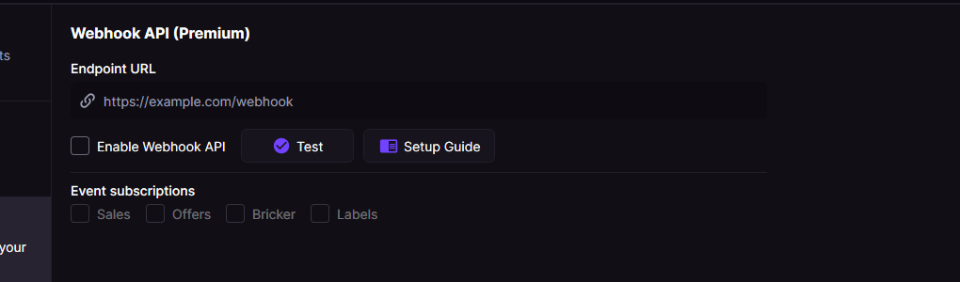
The Webhook API panel lets you point at your own HTTPS endpoint and toggle per-event subscriptions (Sales, Offers, Bricker, Labels).
Premium users can send real-time JSON notifications from RestocksAIO to their own HTTPS endpoint. You can pick which event types to send.
For a high-level overview, see the Webhook API feature page on restock.gg.
eBay, Shopify, Vinted and Wallapop are built-in store channels. Connect them in Settings → Accounts. See Marketplace tab. Use the Webhook API for a platform that RestocksAIO does not support.
Enable
- Open Settings → Webhook API (Premium).
- Enter your HTTPS endpoint.
- Toggle Enable Webhook API and enable the event types you want.
Payload
{
  "event": "event.name",
  "timestampUtc": "2025-01-01T12:00:00Z",
  "data": { /* event-specific fields */ },
  "meta": {
    "appVersion": "3.x",
    "subscription": "Premium",
    "username": "your-login"
  }
}
Events
| Event | When it fires | data fields (type) |
|---|---|---|
sale.detected | New sale or status change | saleId (string), saleName (string), sku (string), site (string), size (string), payout (string), status (string) |
offer.detected | Offer detected | productName (string), sku (string), site (string), size (string), sizeRegion (string), itemId (string), offerAmount (number), offerPayout (number), profitIfAccepted (string), currency (string) |
bricker.price_change | Bricker raises/lowers price | taskId (string), site (string), size (string), oldStorePrice (string), newStorePrice (string), currency (string), reason (string) |
bricker.item_sold | Bricker item sold | taskId (string), site (string), size (string), size_eu (string, optional), size_us (string, optional), size_uk (string, optional), sku (string), orderId (string), storePrice (number), sitePayout (number), sitePayoutAfterFees (number), currency (string), isConsign (boolean) |
bricker.item_deleted | Item deletion attempt | status (string: success/failure), sellingSite (string), productName (string), styleCode (string), size (string), sneakerId (string) |
sale.detected example
{
  "event": "sale.detected",
  "timestampUtc": "2025-01-01T12:00:00Z",
  "data": {
    "saleId": "12345",
    "saleName": "Jordan 1 Retro",
    "sku": "555088-105",
    "site": "StockX",
    "size": "10",
    "payout": 245.50,
    "status": "Detected a new sale!"
  },
  "meta": {
    "appVersion": "3.x",
    "subscription": "Premium",
    "username": "your-login"
  }
}
offer.detected example
{
  "event": "offer.detected",
  "timestampUtc": "2025-01-01T12:00:00Z",
  "data": {
    "productName": "Jordan 4 SB Pine Green",
    "sku": "DR5415-103",
    "site": "Wethenew",
    "size": "10",
    "sizeRegion": "EU",
    "itemId": "987654",
    "offerAmount": 320.0,
    "offerPayout": 300.0,
    "profitIfAccepted": "+45.00",
    "currency": "EUR"
  },
  "meta": {
    "appVersion": "3.x",
    "subscription": "Premium",
    "username": "your-login"
  }
}
bricker.price_change example
{
  "event": "bricker.price_change",
  "timestampUtc": "2025-01-01T12:00:00Z",
  "data": {
    "taskId": "BRK-001",
    "site": "StockX",
    "size": "9.5",
    "oldStorePrice": "250.00",
    "newStorePrice": "242.50",
    "currency": "EUR",
    "reason": "We lowered the price of your sneaker!"
  },
  "meta": {
    "appVersion": "3.x",
    "subscription": "Premium",
    "username": "your-login"
  }
}
bricker.item_sold example
{
  "event": "bricker.item_sold",
  "timestampUtc": "2025-01-01T12:00:00Z",
  "data": {
    "taskId": "BRK-002",
    "site": "Alias",
    "size": "10",
    "size_eu": "44",
    "size_us": "10",
    "size_uk": "9",
    "sku": "DD1391-100",
    "orderId": "ALIAS-7788",
    "storePrice": 180.0,
    "sitePayout": 190.5,
    "sitePayoutAfterFees": 185.0,
    "currency": "EUR",
    "isConsign": false
  },
  "meta": {
    "appVersion": "3.x",
    "subscription": "Premium",
    "username": "your-login"
  }
}
bricker.item_deleted example
{
  "event": "bricker.item_deleted",
  "timestampUtc": "2025-01-01T12:00:00Z",
  "data": {
    "status": "success",
    "sellingSite": "StockX",
    "productName": "Jordan 1 Retro",
    "styleCode": "555088-105",
    "size": "10",
    "sneakerId": "12345"
  },
  "meta": {
    "appVersion": "3.x",
    "subscription": "Premium",
    "username": "your-login"
  }
}
Connect another platform
RestocksAIO publishes to eBay, Shopify, Vinted and Wallapop itself. While the app runs, a sale of a linked unit lowers or removes the other listings of that unit. You do not need a webhook for these platforms.
For a platform that RestocksAIO does not support, the Webhook API sends each sale to an endpoint that you control. Your code then ends the listing on the other platform. Know these points about the delivery:
- The app sends each event one time, as JSON. The request has no signature, and the app does not retry it.
- When your endpoint is down, the event is lost and the app logs the failed answer.
- De-duplicate on
saleIdand keep the URL secret. - Return
200immediately and do the API calls in the background. - Do not treat a webhook as proof that another platform removed the stock.
Use the Webhook API feature page for an overview of custom connections. The event reference above describes the payloads your code receives.