 RestocksAIO Docs
Marketplace tab
The Marketplace tab shows your eBay, Shopify, Vinted and Wallapop products with their sizes, stock and prices, and holds every action on them.
The Marketplace tab shows the products on your eBay, Shopify, Vinted and Wallapop stores. For eBay, the tab shows the listings that RestocksAIO published. It cannot show listings that you made on the eBay website yet. Each product opens into its sizes, with the stock and the price on each store. You go live, change prices, set quantities, link units and end listings here.
eBay, Shopify, Vinted and Wallapop listings are in this tab only. The Listings tab holds the resale marketplaces, such as StockX and Alias.
Go to listing in the unit detail and the link chip of a unit in Inventory open this tab on the product when an eBay, Shopify, Vinted or Wallapop listing holds the unit. For other units, they open Listings.
The Marketplace tab is included in Premium.
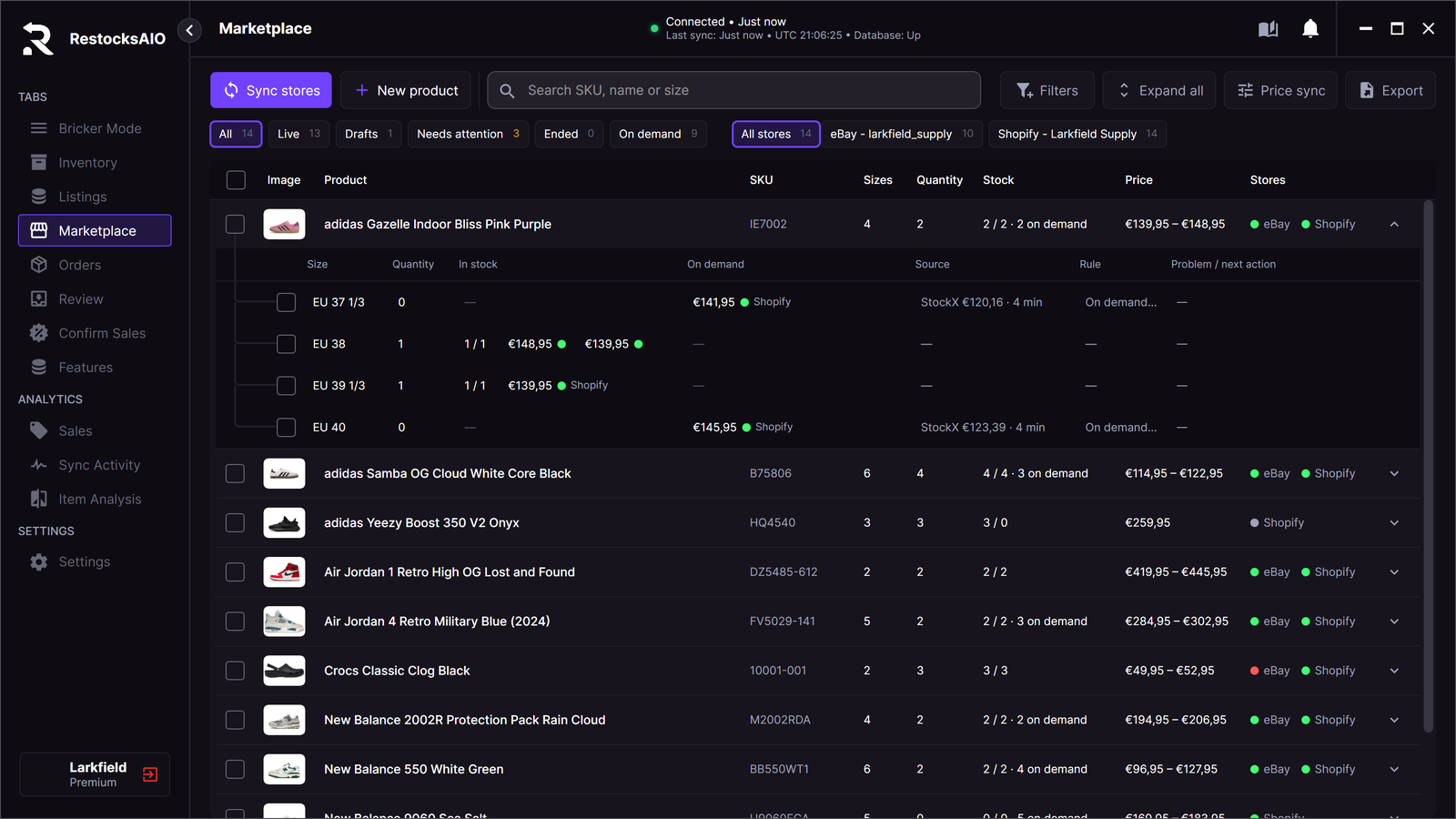
The Marketplace tab. Each product opens into its sizes.
Toolbar
| Button | What it does |
|---|---|
| Sync stores | Reads every eBay, Shopify, Vinted and Wallapop account again. |
| New product | Starts a listing. See Create a listing. |
| Search | Finds a product by SKU, name or size. Separate several terms with commas. |
| Filters | Shows only Not backed by a unit, Priced by a rule or No price rule. |
| Expand all / Collapse all | Shows or hides the sizes of every product. |
| Price sync | Opens the Price sync. |
| Export | Saves the products shown as a CSV file. |
Chips
| Chip | Shows |
|---|---|
| All | Every product on your stores. |
| Live | Products with a size live on a store. |
| Drafts | Products with a size saved as a draft. |
| Needs attention | Products refused by the store, with more advertised than you hold, or with a decision that waits in Review. |
| Ended | Products with a size that ended or was unpublished. |
| On demand | Products with a size a store sells without stock. |
With two or more stores, All stores and one chip for each store narrow the list to a store.
If a store was last read more than 30 minutes ago, a line under the chips tells you. Click Sync stores to read it again.
Columns
A product row shows Image, Product, SKU, Sizes, Quantity, Stock, Price and Stores.
- Click the SKU to copy it.
- Stock reads units held / units advertised, then the number of on-demand sizes. Example:
3 / 3 · 3 on demand. - Stores has one dot for each store. Hover over a dot to read its state: Live, Draft, Ended, Unpublished, Refused by the store or Live, needs attention.
A size row shows Size, Quantity, In stock, On demand, Source, Rule and Problem / next action.
- In stock is the offer backed by your units, with its price on each store.
- On demand is each offer the store sells without stock. See On-demand sizes.
- Source and Rule show the monitored buy cost and the rule of the size.
- Problem / next action names what is wrong and what to do, for example 2 not backed by a unit · Link units.
Actions
Tick sizes or products to open the selection bar. It shows the number of products and sizes, then Go live, Change price, Assign rule… and More.
The same menu opens with a right-click on a row, and with the More for this size button. An entry that cannot work on the selection is off and says why.
| Action | What it does |
|---|---|
| Open in store | Opens the store page of the listing in your browser. A draft has no store page until it goes live. |
| Edit listing | Opens the title, description and photos of one eBay or Shopify listing. Save writes the change to the store. Vinted and Wallapop listings cannot be edited here. |
| Go live | Publishes the selected drafts as they are. For eBay, RestocksAIO first asks eBay for the listing fees and stops when eBay returns a warning. It shows no fee amount. |
| Publish again | Puts an unpublished Shopify product back on its sales channel. Its sizes, prices and quantities do not change. It also puts a Shopify size you ended back on sale. |
| Change price | Opens the price toolbox for the selected sizes and writes the new price to their stores. |
| Set quantity | Opens one row per store variant with On store, Linked units and New quantity. Only the changed rows are sent. |
| Link units | Opens Linking for the in-stock offers of the row, where you link or unlink Inventory units. |
| Assign rule | Puts the sizes on one rule. Clear price rule takes them off their rule. |
| Open in Review | Opens the Review card of the size. |
| Copy SKU | Copies the product SKU. |
| Delete the unpublished eBay draft | Deletes an eBay offer that was never live. |
| End / unpublish | Ends the listing. See the next section. |
End or unpublish
RestocksAIO tells you what the action does before it does it.
| Store | Selection | Result |
|---|---|---|
| eBay | A listing | Withdraw from eBay: the eBay offer ends. |
| Shopify | Every size of a product | Unpublish from Shopify: the product leaves the sales channel and stays in the shop with its sizes. |
| Shopify | One size, or several sizes but not all | End sizes on Shopify: the sale of the size stops. The size stays on the product with no quantity, and Shopify shows it as sold out. The variant is not deleted. |
One size on Shopify. This is what End sizes on Shopify does:
- The size reads Ended. Its units stay linked. The product stays listed with its other sizes.
- RestocksAIO sets the quantity at the inventory location of the account to 0 and stops the sale at zero stock. It does not change the price, the barcode or stock tracking.
- Publish again puts the size back on sale. A size that sold from stock takes the quantity of its linked units.
- While a size is ended, a sale, a store read or a unit that leaves Inventory writes no quantity to it. Set quantity and Link units are off for it.
- A size you put back on sale in Shopify is no longer ended.
- If Shopify does not track stock for the size, RestocksAIO refuses the action: Shopify does not track stock for this size, so its sale cannot be stopped on its own. Turn on stock tracking for it in Shopify, or end the whole product.
- A store with several locations still sells the stock it holds at another location. RestocksAIO changes the quantity at the inventory location of the account only.
Limits:
- An ended eBay listing that RestocksAIO published can go up again with Relist from backup. See Relist from a Saved Copy.
- A Shopify draft was never on the sales channel, so it cannot be ended here. Delete it in Shopify.
Quantities
For a size backed by linked units, the quantity on the store equals the number of linked units. To advertise a different quantity, change the links first.
An on-demand size holds no quantity, because the store sells it without stock.
If the quantity on the store changed before your change was sent, RestocksAIO does not overwrite it. Click Sync stores, then set the quantity again.
After a publish
After a publish, the new listings show in this tab at once. You do not have to click Sync stores.
A store can show a new listing late. When the next read of the store does not return a listing that RestocksAIO wrote in the last 15 minutes, the tab keeps it. RestocksAIO writes nothing to the store for this. After 15 minutes, the next read decides.
One unit on several channels
One Inventory unit can back an offer on eBay, on Shopify and on your resale marketplaces at the same time. The quantity of each store comes from the units linked to its offer.
- When RestocksAIO reads an eBay or Shopify order, the sold unit leaves every offer it backed. Each other store is written down to the units it still holds. At 0, the listing is ended or withdrawn.
- The same happens when a unit leaves Inventory in another way: it sold on a resale marketplace, you marked it sold, or you deleted it.
This lowers the risk of a double sale. It cannot remove the risk.
- RestocksAIO must be open.
- A sale on eBay or Shopify is seen at the next order read. Shopify is read about every 10 minutes and eBay about every 15 minutes.
- Only linked units count. A listing with no linked unit is not lowered.
- If a store refuses the change, a Quantity conflict card appears in Review. RestocksAIO does not retry it silently.
When a pair sells on eBay or Shopify
An eBay or Shopify order takes its linked unit out of Inventory and records the sale. Then RestocksAIO looks for the same pair on your resale marketplaces, such as StockX and Alias. Two settings under Settings → Bricker → Store orders decide what it does there. See Bricker Mode Settings.
| Listing of the sold pair | What happens |
|---|---|
| A Bricker Mode task of the pair has the listing | The task deletes its listing. This is the setting Delete pair listings after an eBay or Shopify sale. It is on unless you turned off Delete pair listings in sale. |
| The listing is in Listings and no Bricker task has it | The listing stays, and Review shows it. With Also delete listings without a Bricker task on, RestocksAIO deletes it. That setting is off by default. |
| Several listings match and none is linked to the sold unit | RestocksAIO does not guess. Nothing is deleted, and Review shows Sold elsewhere, still listed with the count. Delete the right listing in Listings, then dismiss the row. |
| The listing is consigned or Flex | It is never deleted. |
| The marketplace refuses the delete | The listing stays. Review shows the row with Retry deletion. |
- RestocksAIO deletes one listing for each sold pair, on each marketplace and category (Resale, Direct). The listing linked to the sold unit comes first. A listing that belongs to another unit in Inventory is never taken.
- On a marketplace that holds a quantity, such as KICKS CREW, Woovin, SneakerAsk and POIZON, the listing loses one unit.
- With both settings off, the order still takes the unit and records the sale. No marketplace is asked, and each listing that stays live is a Review row.
This lowers the risk of a double sale. It cannot remove the risk. RestocksAIO sees a store order at the next read: Shopify about every 10 minutes and eBay about every 15, while the app is open. Until then the resale listing is live and can sell.
Empty states
- Connect an eBay or Shopify store: no store is connected. Click Open Accounts.
- Nothing on your stores yet: the store has no product. Use New product.