 RestocksAIO Docs
AI Reply Drafts
Let the AI write a reply draft in the Chats composer from your instructions, your facts and the conversation. You read the draft and press Send. The AI never sends a message, an offer or an answer on its own. Premium and the Marketplace plan.
In Chats, the AI draft button writes a reply draft into the reply box. You read the draft, change it if needed, and press Send. The AI never sends a message, an offer or an answer on its own.
AI reply drafts are part of Premium and the Marketplace plan. They use the AI provider of Settings → AI, as the Seller Assistant does. RestocksAIO AI (included) counts as a provider.
Write a draft
- Open a conversation in Chats → Inbox.
- Click AI draft next to the reply box.
- Read the draft. The line under the box says "AI draft. Edit it, then press Send. The app never sends an AI draft on its own."
- Change the text if needed.
- Click Send.
The send is the same as a reply that you type. The contact check and the read-back apply. See Reply to a buyer.
The AI reads the last messages of the conversation, the item, your instructions, your facts and your questions and answers. It uses only these facts. It writes no contact details, no links and no payment method outside the channel.
Prices in a draft
- A draft never names a price below the payout floor of the item.
- When the item has no Inventory link with a known floor, the draft names no price. If the buyer asks about the price, the draft says that you answer about the price yourself.
RestocksAIO checks each draft for prices. When a draft breaks the rule, the AI gets one more try. If the second draft also breaks the rule, RestocksAIO does not use it: "The AI draft was not used: … Write the reply yourself."
Set up the AI replies
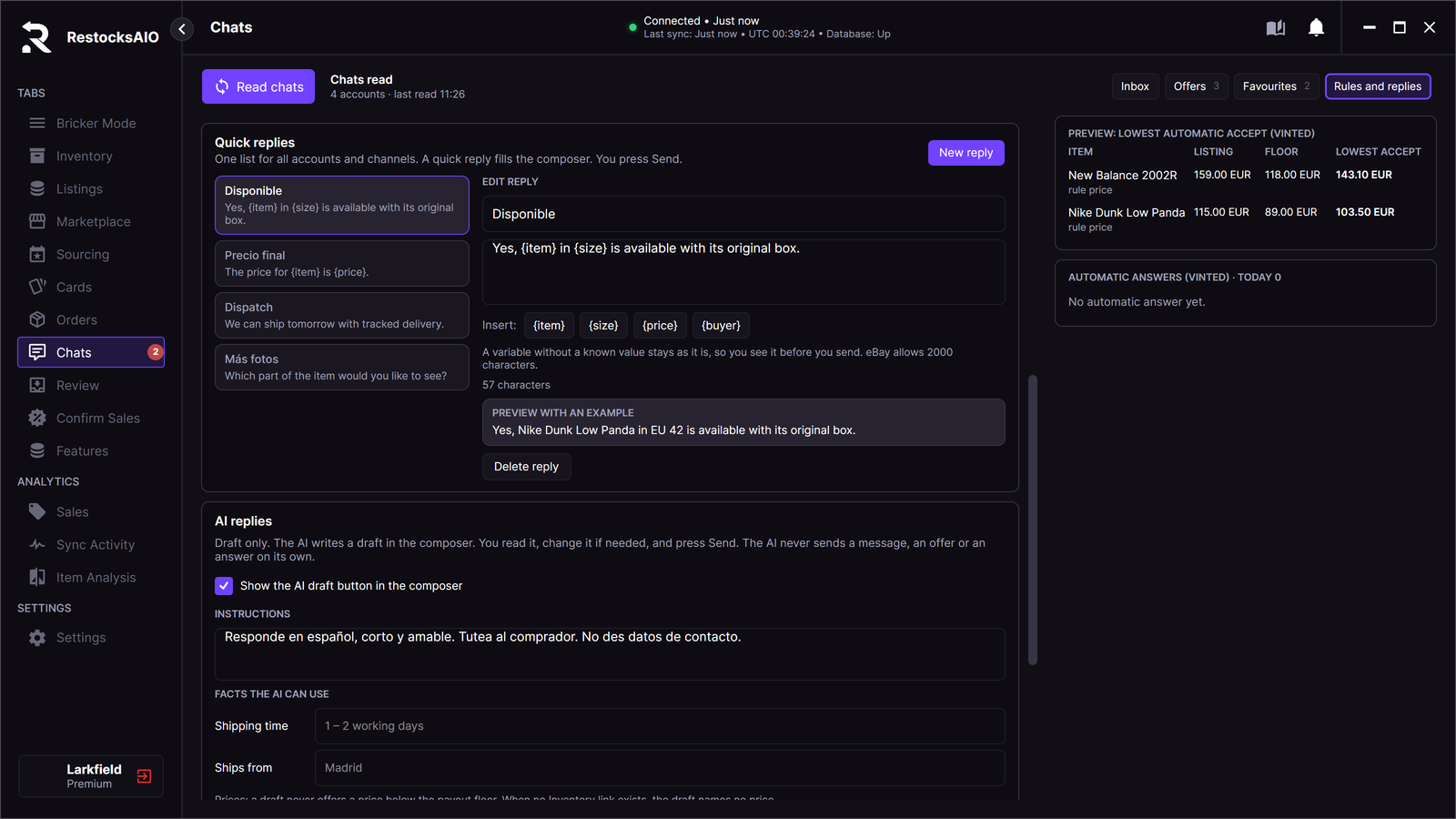
The quick-reply editor shows reusable replies. Sample data.
- Open Chats → Rules and replies.
- Go to AI replies.
- Check that Show the AI draft button in the composer is ticked. It is on by default. Untick it to hide the button.
- In INSTRUCTIONS, tell the AI how to write. The default is "Responde en español, corto y amable. Tutea al comprador. No des datos de contacto."
- In FACTS THE AI CAN USE, fill in Shipping time and Ships from.
- Under QUESTIONS AND ANSWERS, click Add a question for each question that buyers often ask. Type your answer.
The settings serve all accounts. RestocksAIO saves each change when you leave the field.
Hand over to you
The AI can hand a conversation to you instead of a draft. Under HAND OVER TO YOU WHEN, tick the cases:
- The AI cannot answer from the facts.
- The buyer asks about a fault or a return.
- The buyer seems upset.
- The buyer asks for a lower price than the floor.
The first three cases are ticked by default.
On a handover, the AI writes no draft. The line under the box says "Needs you: …" with the reason. The conversation gets the tag Needs you in the inbox, and the app shows a notification. The tag stays until you write in the conversation.