 RestocksAIO Docs
eBay VAT for business sellers
Set the VAT of your eBay sales in Accounts → eBay. Each sale gets the VAT of its buyer, profit counts the sale without VAT, and invoices show the rate and the legal note.
A VAT-registered business sells on eBay with standard VAT. RestocksAIO then gives each eBay sale the VAT of its buyer. Profit, invoices and the price that you receive use it.
The VAT settings show for an eBay account of an EU eBay site, for example eBay Spain, Germany, France or Italy. They need a desktop app version 0.4.42.4 or later.
Set the VAT of the account
- Open Settings → Accounts.
- Select the eBay account and open Publishing defaults.
- Choose VAT on eBay sales.
- Choose EU private buyers.
- Click Save settings.
| Field | What to choose |
|---|---|
| VAT on eBay sales | Standard VAT with the rate of your country, for example Standard VAT (21 %) in Spain. Choose No VAT (not VAT registered) when you do not charge VAT. |
| EU private buyers | The VAT of your country, for example Spanish VAT, while your sales to private buyers in other EU countries stay under 10,000 € a year. Choose OSS (buyer's country VAT) when you are registered in the One-Stop Shop. |
| VAT status on eBay | Read-only. What eBay records for the account: the seller type and the VAT registration, for example "Business · VAT registered · Standard 21 %". Refresh reads it again. |
Until you choose, VAT on eBay sales follows the VAT status of your eBay account. A VAT-registered business gets Standard VAT. Any other account gets no VAT.
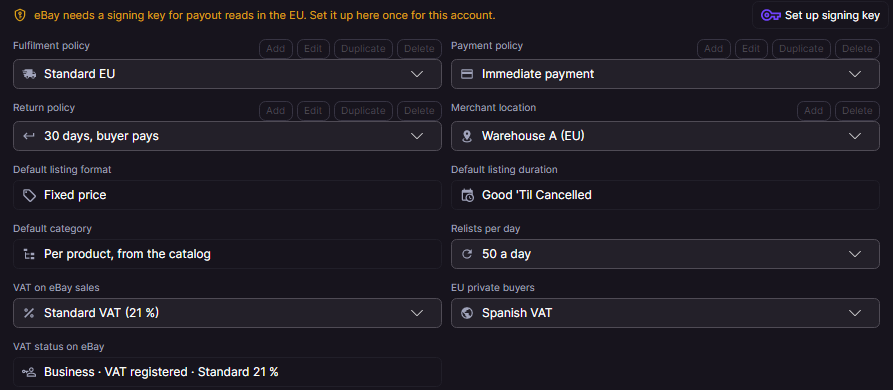
The VAT fields and the signing key of an eBay Spain account. Sample data.
The VAT of each sale
With Standard VAT, the sale price includes the VAT. RestocksAIO keeps the VAT of the buyer on each imported eBay sale:
| Buyer | VAT of the sale |
|---|---|
| In your country | The standard rate of your country, for example 21 % in Spain. |
| A private buyer in another EU country | The rate of your country. With OSS, the rate of the country of the buyer. |
| A business in another EU country with a VAT ID | 0 %, reverse charge. |
| Outside the EU | 0 %, export. |
- Sales counts the profit on the sale without VAT.
- An invoice of an eBay order shows the VAT rate of the line, the legal note and the VAT ID of the buyer. The legal note names the reverse charge, the export or the OSS.
- You receive in the Publish Composer is after the fees and the VAT of a buyer in your country, for example "after fees and 21 % VAT".
- A new eBay listing of the account declares your VAT rate to eBay, for example 21 % on eBay Spain. eBay shows the rate to business buyers. A live listing keeps what it had.
With No VAT, a sale has no VAT, and a new listing declares no VAT rate. Shopify, Vinted and Wallapop do not change.
Set up the signing key
eBay asks for a signing key before it gives the payout data of an EU seller. Without a key, the account page says "eBay needs a signing key for payout reads in the EU. Set it up here once for this account."
- Open the eBay account in Settings → Accounts.
- Click Set up signing key.
RestocksAIO makes one key for this account and keeps it with the account. The page then says "The signing key is ready. eBay payout reads of this account are signed from now on." You do this one time for each account.
Without the key, a payout read of the account says "eBay needs a signing key for payout reads in the EU. Set it up in Accounts → eBay."