 RestocksAIO Docs
Buyer Offers and Offer Rules
Accept, counter or decline eBay, Vinted and Wallapop buyer offers in Chats, with your payout and the payout floor on each offer. Answer many offers at once on the Offers board, and let offer rules suggest or send the answer. Premium and the Marketplace plan.
Buyer offers of eBay, Vinted and Wallapop show in Chats. You answer an offer in its conversation, or many offers at once on the Offers board. Offer rules can suggest the answer, or send it for you.
Buyer offers are part of the store channels in Premium and the Marketplace plan. They are in the macOS app and the new Windows app. Vinted and Wallapop buyer offers are no longer in Confirm Sales.
The offer card
A buyer offer shows as a card in its conversation:
- Vinted buyer offer
- Wallapop purchase request
- eBay Best Offer · outside the messages. eBay keeps Best Offers apart from the messages, so the card sits above the conversation.
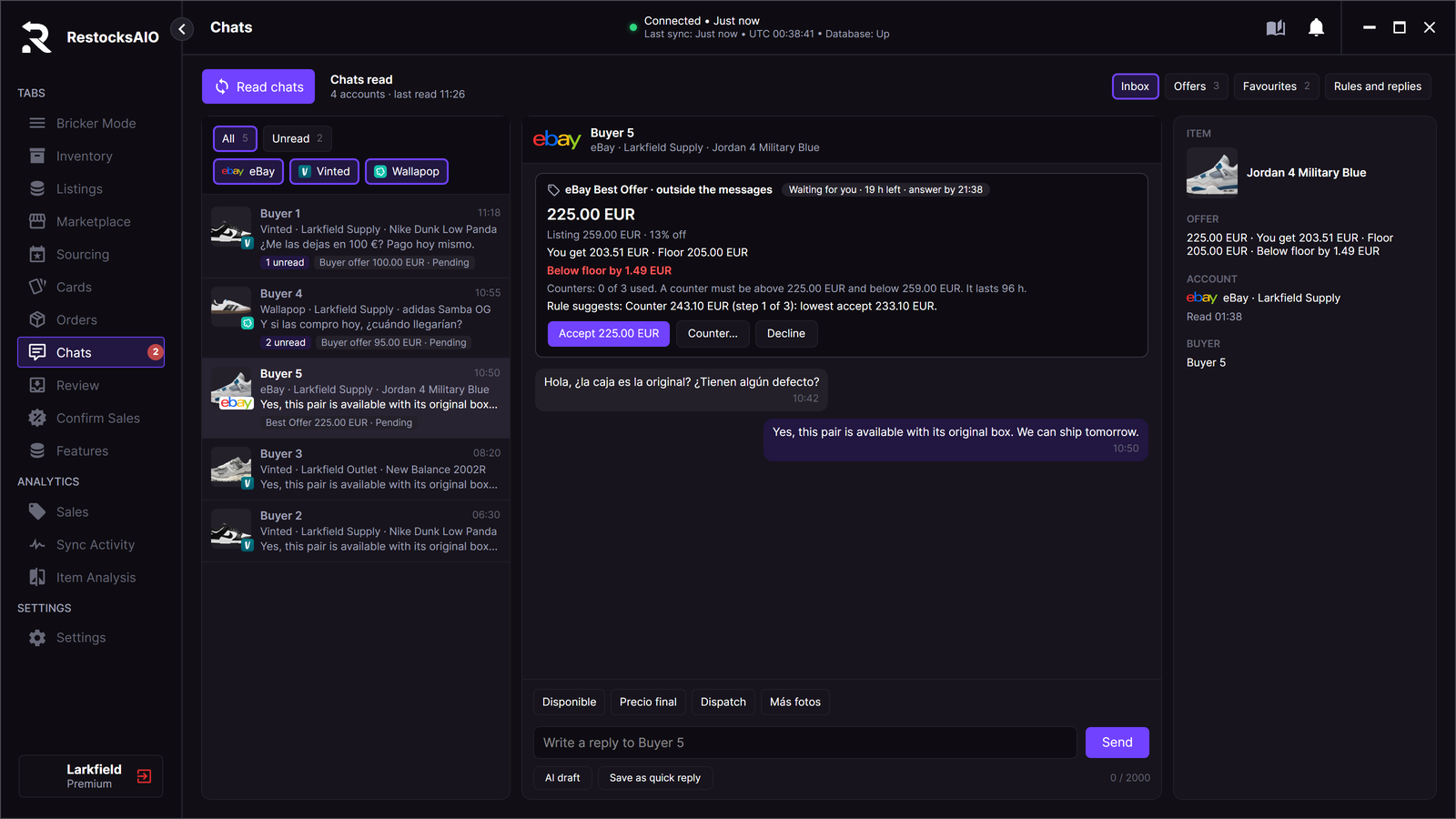
An eBay Best Offer below the floor. Sample data.
The card shows:
- the offer price, the listing price and the discount, for example "Listing 259.00 EUR · 13% off".
- You get: your payout at the offer price, after the fees of the channel.
- Floor: the payout floor of the item. It comes from the cost of the linked Inventory units and your minimum payout rules.
- Above floor by … or Below floor by ….
- the limits of the channel, for example the counter range.
- the rule suggestion, when offer rules are on for the channel.
A value that the app does not know shows as Unknown, never as 0. An item without an Inventory link has no floor. The card then says "Floor check not possible."
Answer an offer
Each card has three buttons:
- Accept … accepts the offer at the buyer's price.
- Counter… opens Your counter. Type your price, for example 105.00, and click Send counter….
- Decline declines the offer.
RestocksAIO asks you to confirm each answer, for example "Accept the offer of lucia_mrtz?". Then it sends one write and reads the conversation back. The result shows on the card: Done · read back, Failed: nothing was sent or Sent, not confirmed. See The result of a send.
Below the floor
When your answer is below the payout floor, RestocksAIO asks a second time. The button names the price: Confirm: send … below floor.
When the item has no Inventory link, the floor is unknown. RestocksAIO then asks Send without a floor check. Link the listing in Inventory first, or send without the check.
Counter limits of each channel
| Channel | Counter limits |
|---|---|
| Vinted | Vinted gives the counter range for each offer. RestocksAIO reads it when you open Counter…, for example "Vinted accepts a counter from 1.00 EUR to 115.00 EUR". A Vinted offer has no expiry. |
| Wallapop | Wallapop gives no counter limits. The counter sets a new offer price. |
| eBay | A counter must be above the offer and below the listing price. eBay allows 3 counters for each buyer and item. The card shows "Counters: n of 3 used". A counter lasts 96 h. |
The Offers board
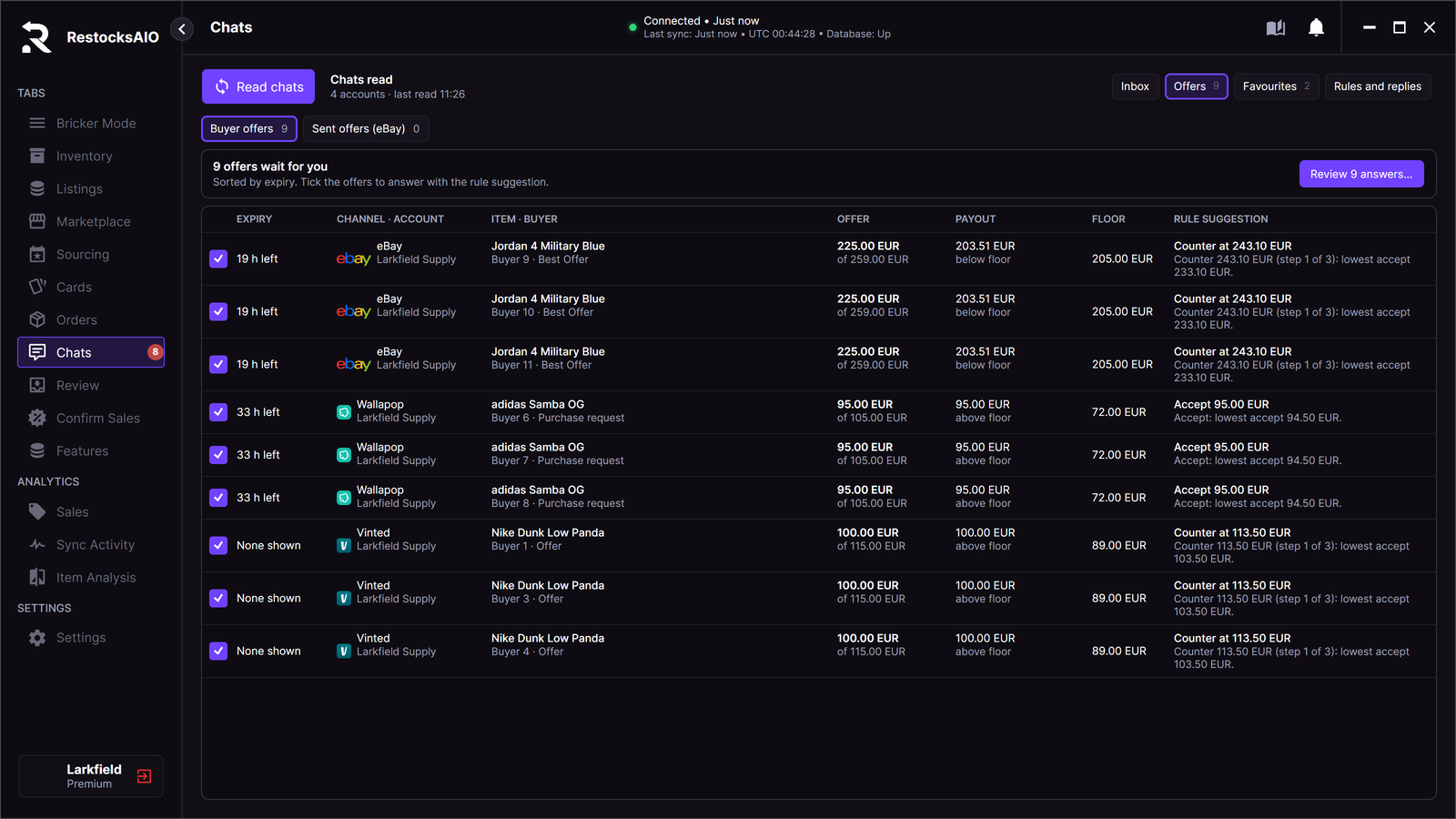
Chats → Offers → Buyer offers. Sample data.
Chats → Offers → Buyer offers lists every offer that waits on all your accounts. The offers that end first are at the top.
| Column | What it shows |
|---|---|
| EXPIRY | The time left to answer. Vinted shows no expiry, so the board shows "None shown". |
| CHANNEL · ACCOUNT | The channel and the account. |
| ITEM · BUYER | The item, the buyer and the kind of offer. |
| OFFER | The offer and the listing price. |
| PAYOUT | Your payout at the offer price, and whether it is above or below the floor. |
| FLOOR | The payout floor. |
| RULE SUGGESTION | The answer of your offer rule. See Offer rules. |
Answer many offers at once
The board answers with the rule suggestion. Turn on offer rules for the channel first, at least in Suggest mode.
- Open Chats → Offers → Buyer offers.
- Tick the offers to answer.
- Click Review N answers….
- Read the review. Nothing is sent until you press Send.
- Click Send N answers.
RestocksAIO answers one offer at a time. Before each answer, it reads the offer again. Then it writes the answer once and reads it back. The result shows in each row.
The board has no bulk decline. To decline an offer, open its conversation.
Rows that you cannot tick
Some rows stay on the board but cannot be ticked. Answer them in the conversation. The row says why:
- "Blocked: session expired." Reconnect the account in Settings → Accounts.
- "Blocked: the last read failed. Read the chats again. Nothing is queued."
- "Blocked: the offer expired."
- "Blocked: not linked to Inventory. Payout floor unknown. Answer it in the thread."
- "Blocked: payout floor unknown."
- "Blocked: no rule suggestion."
- "Blocked: below payout floor."
Sent offers (eBay)
Chats → Offers → Sent offers (eBay) lists the offers that you sent to the watchers of your eBay listings. Click Send offer to watchers… to send a new one. See eBay Offers to Watchers.
Offer rules
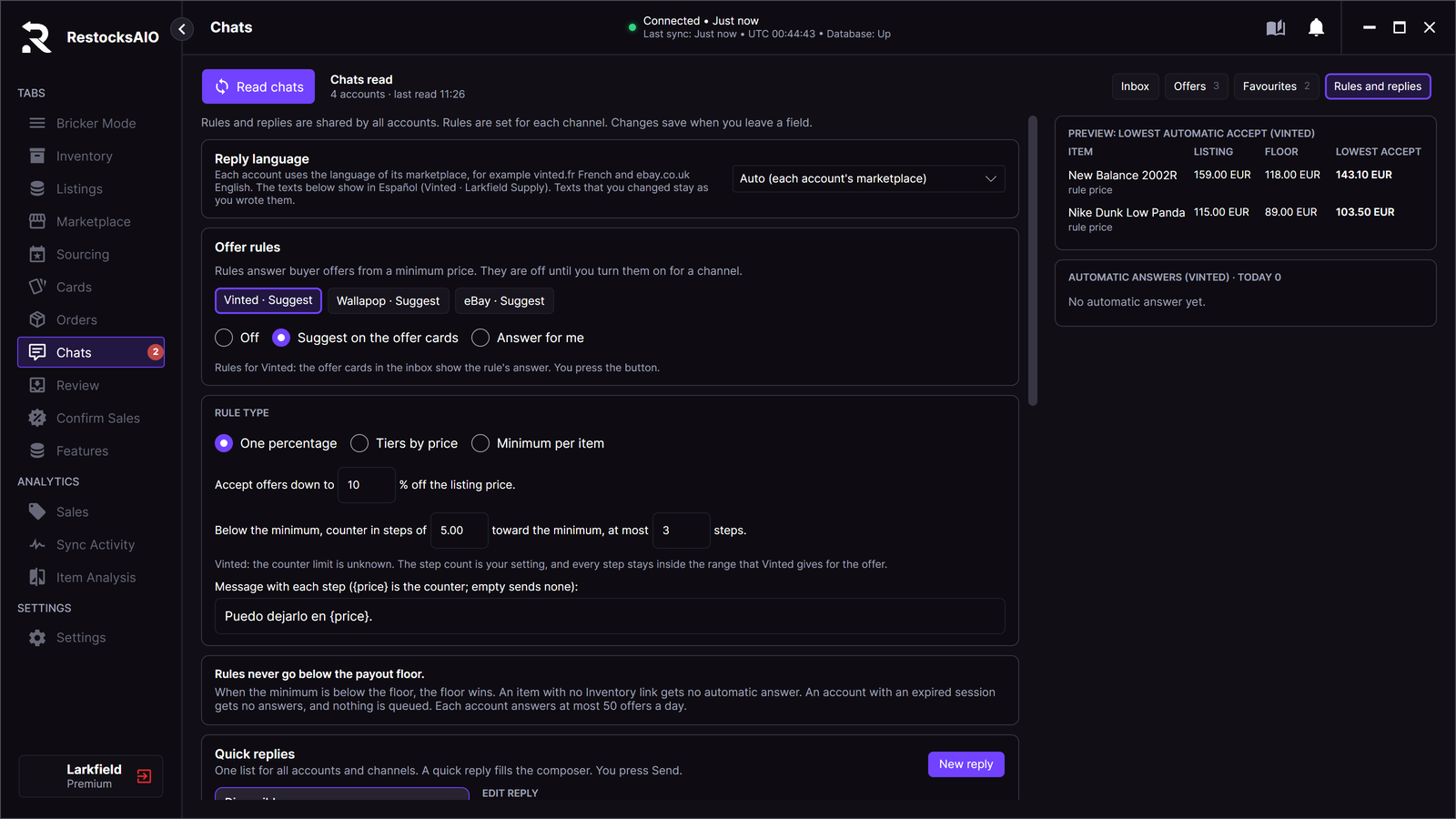
Chats → Rules and replies → Offer rules. Sample data.
An offer rule sets the lowest price that you accept. You set one rule for each channel: Vinted, Wallapop and eBay. All accounts of a channel use the same rule.
- Open Chats → Rules and replies.
- Under Offer rules, click the channel: Vinted, Wallapop or eBay.
- Choose the mode.
- Choose the rule type and fill in its values.
RestocksAIO saves each change when you leave the field.
Modes
| Mode | What happens |
|---|---|
| Off | The rule does nothing. This is the default for each channel. |
| Suggest on the offer cards | The offer cards and the Offers board show the rule's answer. You press the button. |
| Answer for me | RestocksAIO sends the rule's answer for you. |
Rule types
- One percentage: "Accept offers down to N % off the listing price."
- Tiers by price: each tier starts at a listing price and has its own percentage off, from 0 to 90 %. A listing price uses the tier with the highest start price that it reaches. A price below every tier gets no automatic answer.
- Minimum per item: you type a minimum price for each item. An item without a minimum gets no automatic answer.
The lowest accept
The lowest accept is the higher of two prices:
- the price of your rule.
- the floor price: the lowest price whose payout reaches the payout floor.
The lowest accept is never above the listing price. When the rule price is below the floor, the floor wins.
The PREVIEW: LOWEST AUTOMATIC ACCEPT panel shows the listing price, the floor and the lowest accept of your items.
Accept or counter
- An offer at or above the lowest accept gets Accept.
- An offer below the lowest accept gets a counter. The counters come down in steps toward the lowest accept.
Set the steps in "Below the minimum, counter in steps of … toward the minimum, at most … steps." The defaults are 5.00 and 3 steps. The last step is the lowest accept. A counter is never above the listing price.
For example: the listing price is 115.00 EUR and the rule is 10 % off. The lowest accept is 103.50 EUR. A buyer offers 100.00 EUR. Step 1 of 3 is a counter at 113.50 EUR. Step 2 is 108.50 EUR, and step 3 is 103.50 EUR.
The channels set their own limits:
| Channel | Steps |
|---|---|
| Vinted | Your step count. Each step stays inside the range that Vinted gives for the offer. |
| Wallapop | 1 step only, on the minimum. Wallapop gives no counter limits. |
| eBay | At most 3 steps, the eBay limit. |
With each counter, RestocksAIO can send a message. Type it in "Message with each step". {price} is the counter price. An empty box sends no message.
No automatic answer
A rule never goes below the payout floor. A rule gives no answer when:
- the item has no Inventory link, or its floor is unknown.
- the floor is above the listing price.
- the item has no minimum, or no tier covers its price.
- all counter steps are used.
- the Vinted counter range ends below the lowest accept.
- the session of the account has expired. Nothing is queued.
These offers wait for you in the inbox.
Answer for me
When Answer for me is on for a channel, RestocksAIO checks the accounts of that channel every 15 minutes while the app is open. For each account, it reads the chats and answers the offers that wait.
- Each offer gets one try.
- Each answer is one write with a read-back, as for an answer by hand.
- Each account sends at most 50 automatic answers a day.
- After a run, a notification shows "Offer rules: N of M offers answered on … · …".
The panel AUTOMATIC ANSWERS shows the answers of today for the channel.