 RestocksAIO Docs
Market Value
See what a unit is worth when it has no StockX price: a jacket, cat food or a vintage shirt. RestocksAIO uses eBay sold prices and the asking prices on eBay, Vinted and Wallapop.
Market value gives one value for a unit of any product. It works for products that StockX and Alias do not sell, for example a jacket, cat food or a vintage shirt. For catalogue sneakers, the Compare data stays as before.
Market value needs the desktop app version of 16 November 2026 or later.
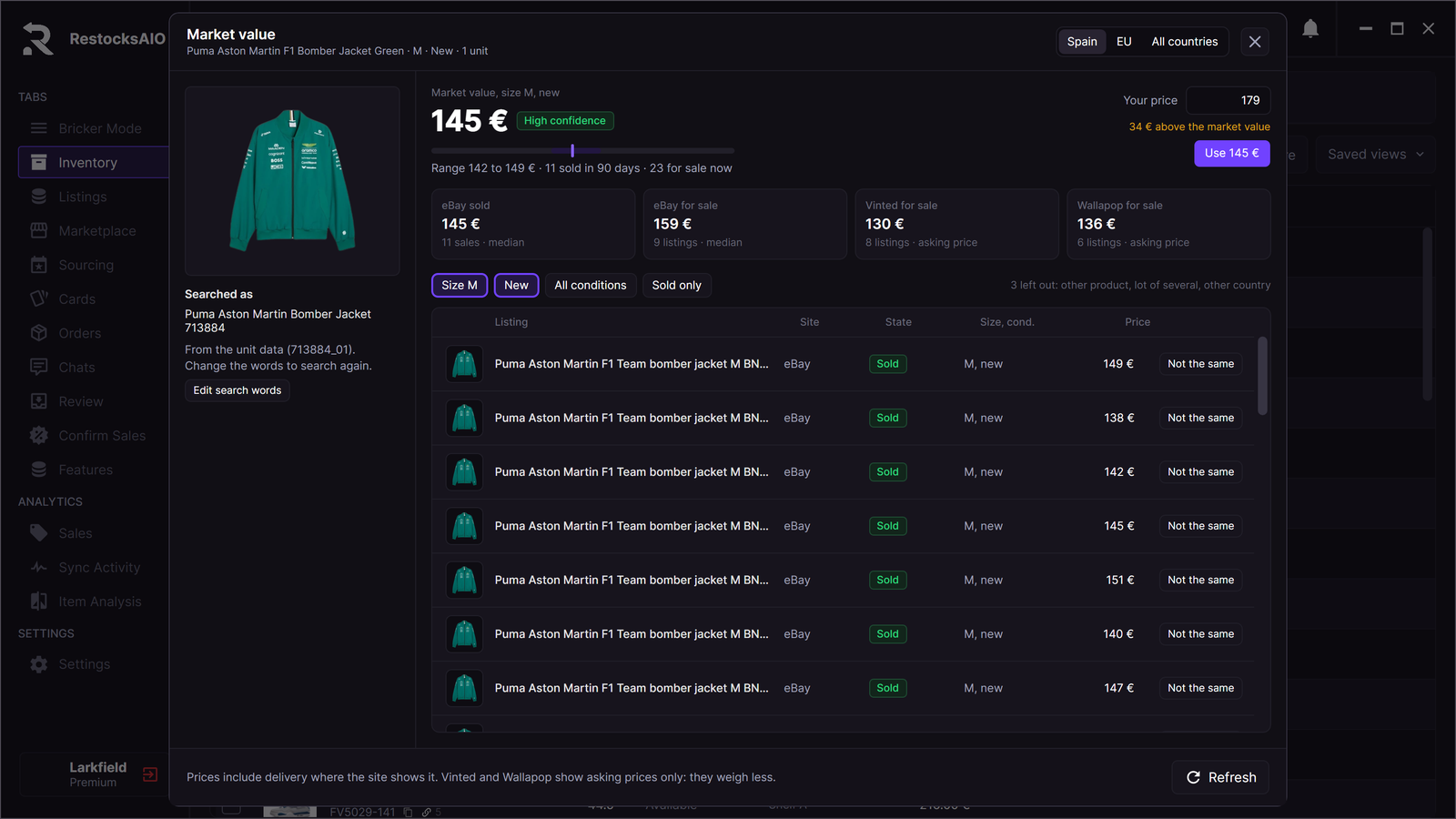
The Market value panel of one unit. Sample data.
Open the panel
- Open Inventory.
- Select a unit.
- Click More → Market value, or right-click the row and choose Market value. You can also click the cell in the Market column.
The panel shows:
- Searched as: the words that RestocksAIO searched, and where they come from, for example "From the unit data (713884_01)". Click Edit search words to search with your own words.
- The value with its confidence, the range, the number of sales in 90 days and the number of listings for sale now.
- Your price: your own asking price for the unit, and the difference, for example "34 € above the market value". Click Use 145 € to set your price to the market value. RestocksAIO saves it at once.
- Four site tiles: eBay sold, eBay for sale, Vinted for sale and Wallapop for sale, each with its median and its count. The sites fill in as they answer.
- The filter chips: the size, the condition (for example New or All conditions) and Sold only.
- Every listing with its site, its state (Sold or for sale), its size and condition and its price. Each listing has a link to its site.
A line above the listings names the listings that RestocksAIO left out, for example "3 left out: other product, lot of several, other country".
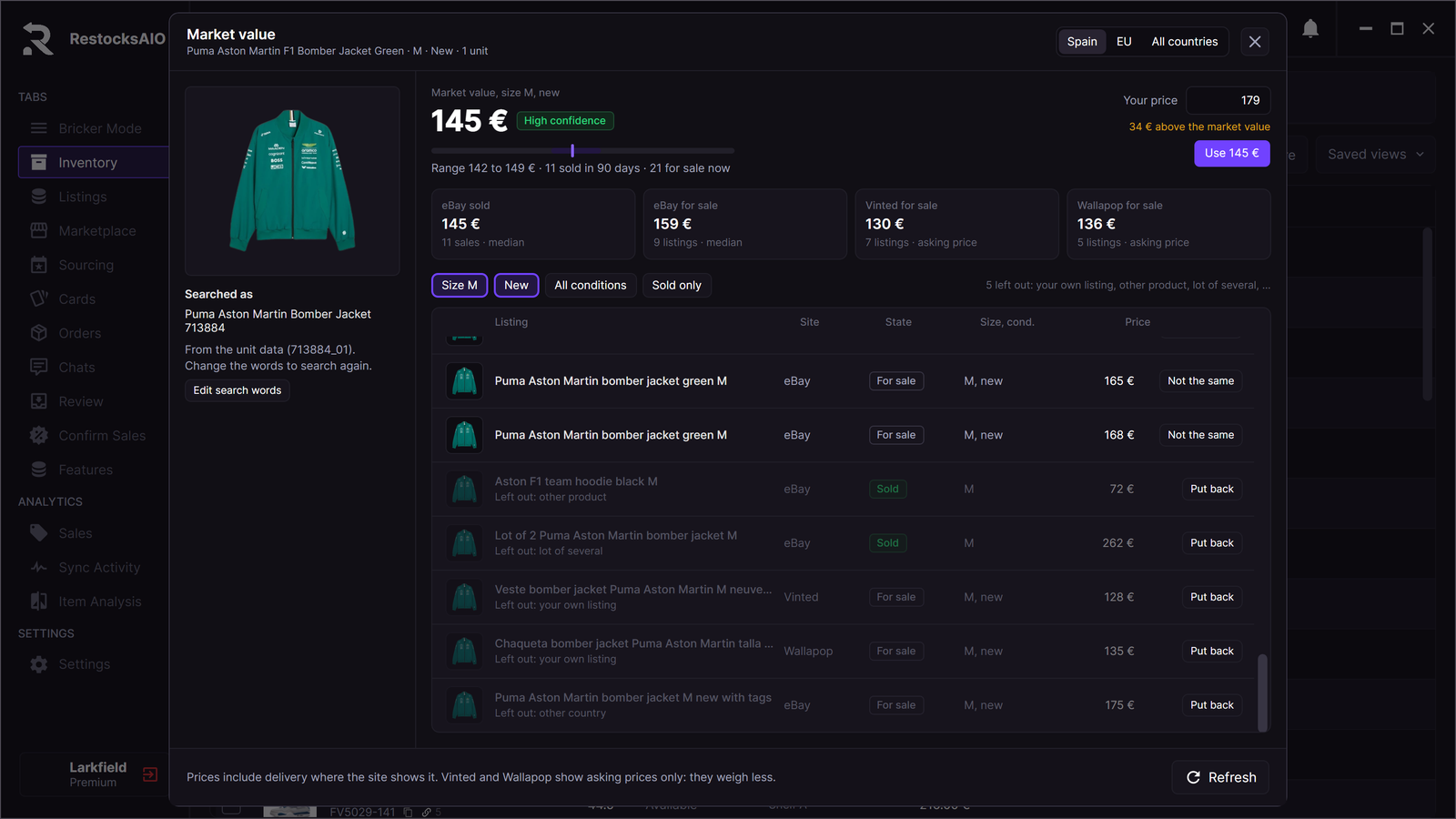
A listing that does not count stays in the list, dimmed, with its reason. Sample data.
How RestocksAIO makes the value
-
The product. RestocksAIO reads the name, the brand, the style code, the size and the condition of the unit. When the name is too short to find the product, the AI photo route reads the product from the photos of the unit, for example from its label or tag.
-
The search. RestocksAIO searches four sources. Each search only reads. It never uses your seller account to write.
Source What it gives eBay sold Sold prices of the last 90 days. It uses the eBay seller session of your desktop (Seller Hub research). eBay for sale The prices of live eBay listings. Vinted The asking prices of Vinted listings. Wallapop The asking prices of Wallapop listings. -
Only the same product. RestocksAIO keeps only the listings of the same product: the style code is in the title, or every key word of the name is. A model code in the name of the unit, for example JC4046PP1OLE0110, counts as a style code. It leaves out a lot, a box only, a replica, another cut (for example a soft shell for a bomber jacket), another named colour, another size, another condition (new or used), another country, another currency, a sale older than 90 days and a price far from the others. Each left-out listing shows its reason.
Your own eBay, Vinted and Wallapop listings never count. Their reason is "your own listing".
-
The value. The value is the median of the eBay sold prices. Recent sales weigh more. The median of the prices for sale is the upper limit. Vinted and Wallapop show asking prices only, so they weigh half.
-
The range. RestocksAIO shows a low and a high price around the value.
A price includes the delivery when the site shows it. Prices in another currency are converted to your currency, or left out when RestocksAIO cannot convert them.
Confidence
| Confidence | When |
|---|---|
| High confidence | 8 or more eBay sales and a narrow range. |
| Medium confidence | 3 or more eBay sales. |
| Low confidence | Fewer than 3 eBay sales, for example when the value comes from asking prices only. |
Countries and filters
The value uses your own country by default, for example Spain. Choose EU to use the listings of the European Union, or All countries to use every listing. A change of country searches again.
The filter chips and Not the same do not search again. RestocksAIO calculates the value again from the listings that it already has. Click Refresh to search again. When you change the search words, click Search again. The search starts at once, also when the Market column checks other rows.
When your eBay sign-in for sold prices ended, the eBay sold tile says "The eBay sign-in ended." Click Sign in to eBay in the tile. After the sign-in, RestocksAIO searches again.
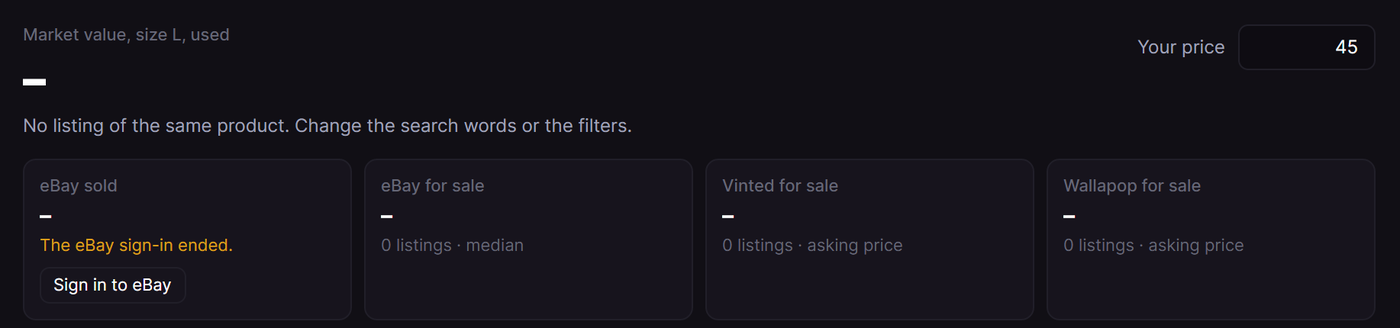
The eBay sold tile after the eBay sign-in ended. Sample data.
Not the same
When a listing that counts is not your product, mark it Not the same. RestocksAIO leaves it out and calculates the value again. Put back counts it again. RestocksAIO keeps these choices for each product.
RestocksAIO keeps an answer for 24 hours. A unit that you open again in that time shows the kept answer and makes no new search.
The Market column in Inventory
Inventory has a Market column and a Your price column.
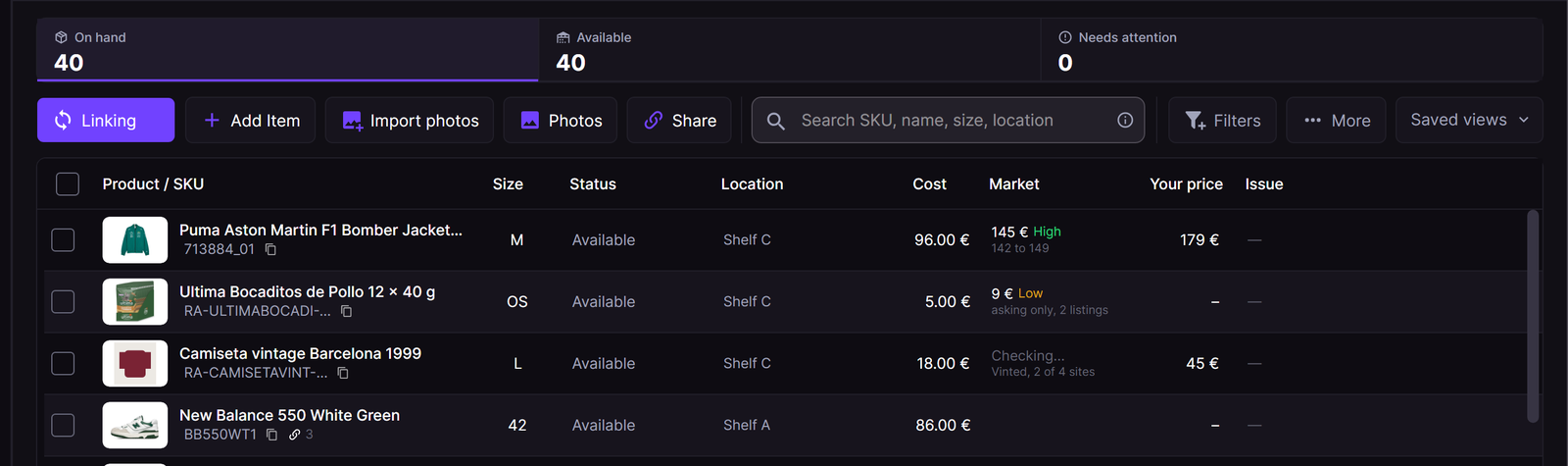
The Market column checks the rows on the screen in the background. Sample data.
- The cell shows the value, the confidence and the range, for example "145 € High, 142 to 149".
- "Checking…" shows while the sites answer, for example "Vinted, 2 of 4 sites".
- "asking only" shows when the value comes from listings for sale only.
- RestocksAIO checks only the rows on the screen, one at a time, in the background. A row that leaves the screen loses its turn. Sold units are not checked.
- Click a cell to open the panel of the unit.
The hint in the publish composer
The publish composer shows the market value under the price of each channel, for example "Market 150 € (147 to 154), High".
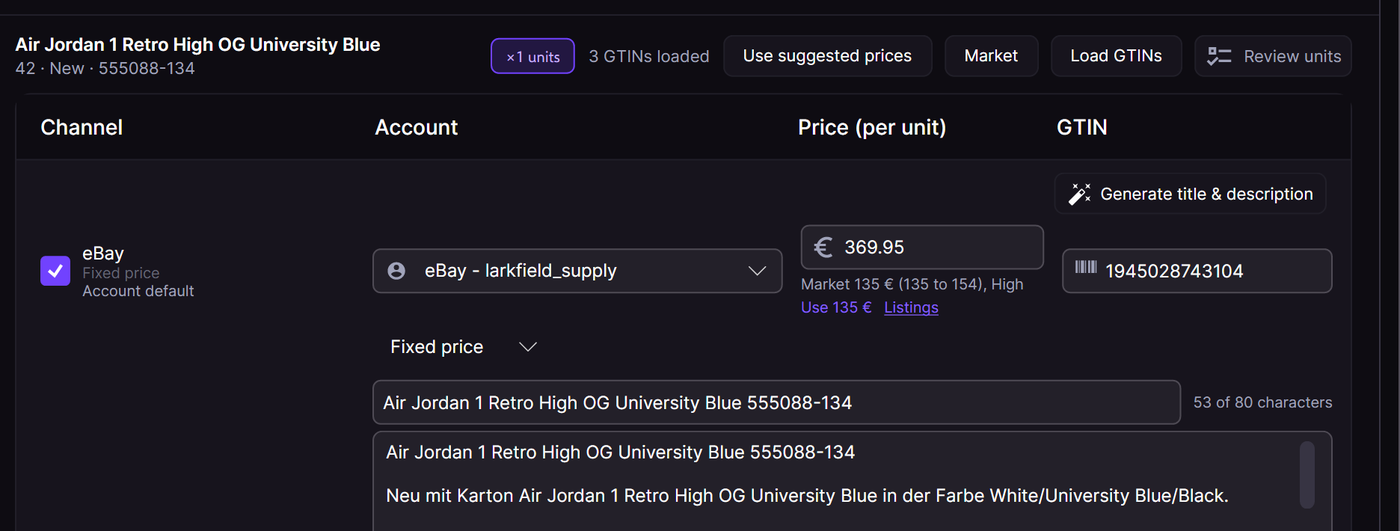
The market value under the channel price. Sample data.
- Click Use 150 € to set the price of that channel.
- Click Listings to open the panel. Use in the panel then sets the price of that channel.
The price suggestion of the channel stays on its own line.
On the phone
Open a unit in the phone app: Inventory → tap the unit. The card Market value shows the value, the range, the sales on eBay, the listings for sale on Vinted and Wallapop, and the confidence. Tap See the listings to see the listings that count, and choose your country (for example Spain), EU or All countries. Your desktop does the search. See Phone App.
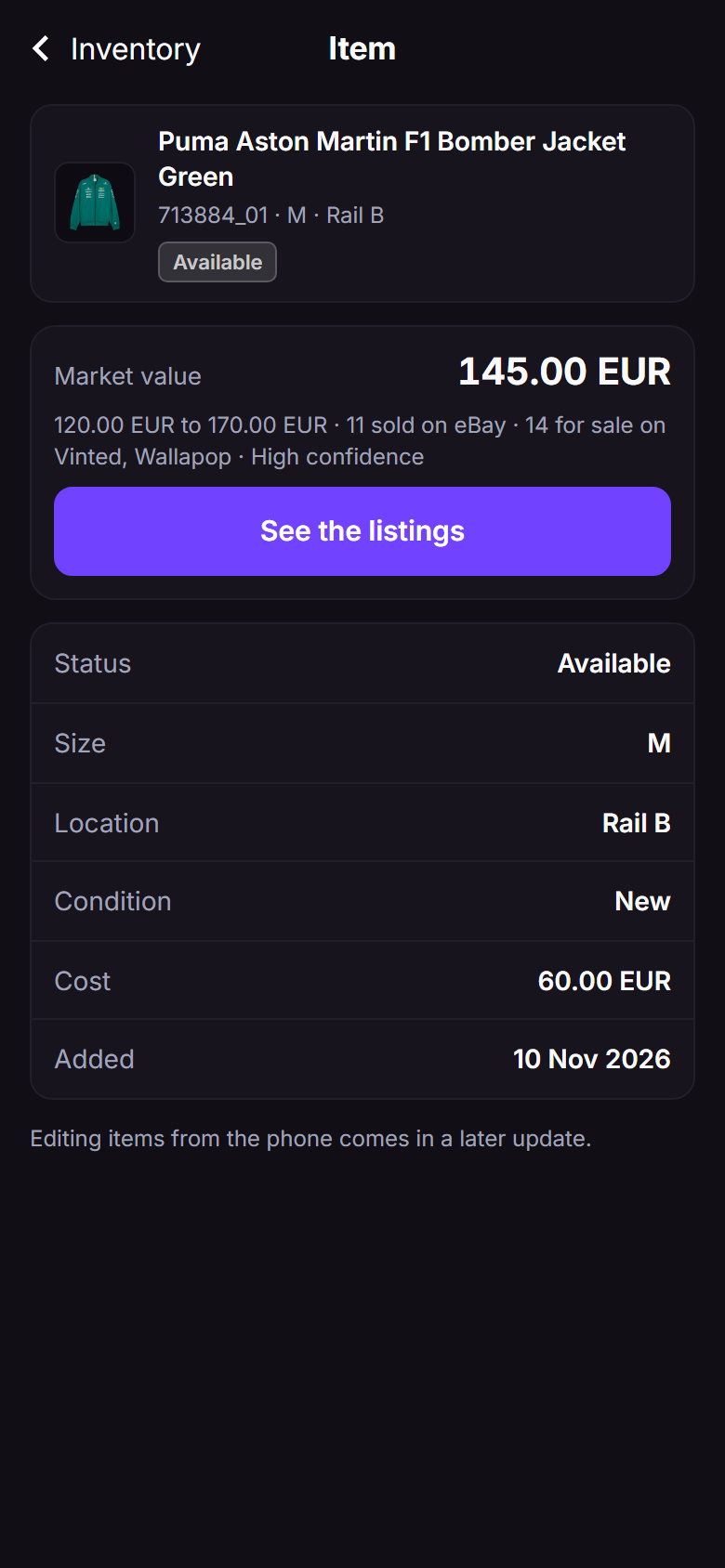
The market value of one unit on the phone. Sample data.
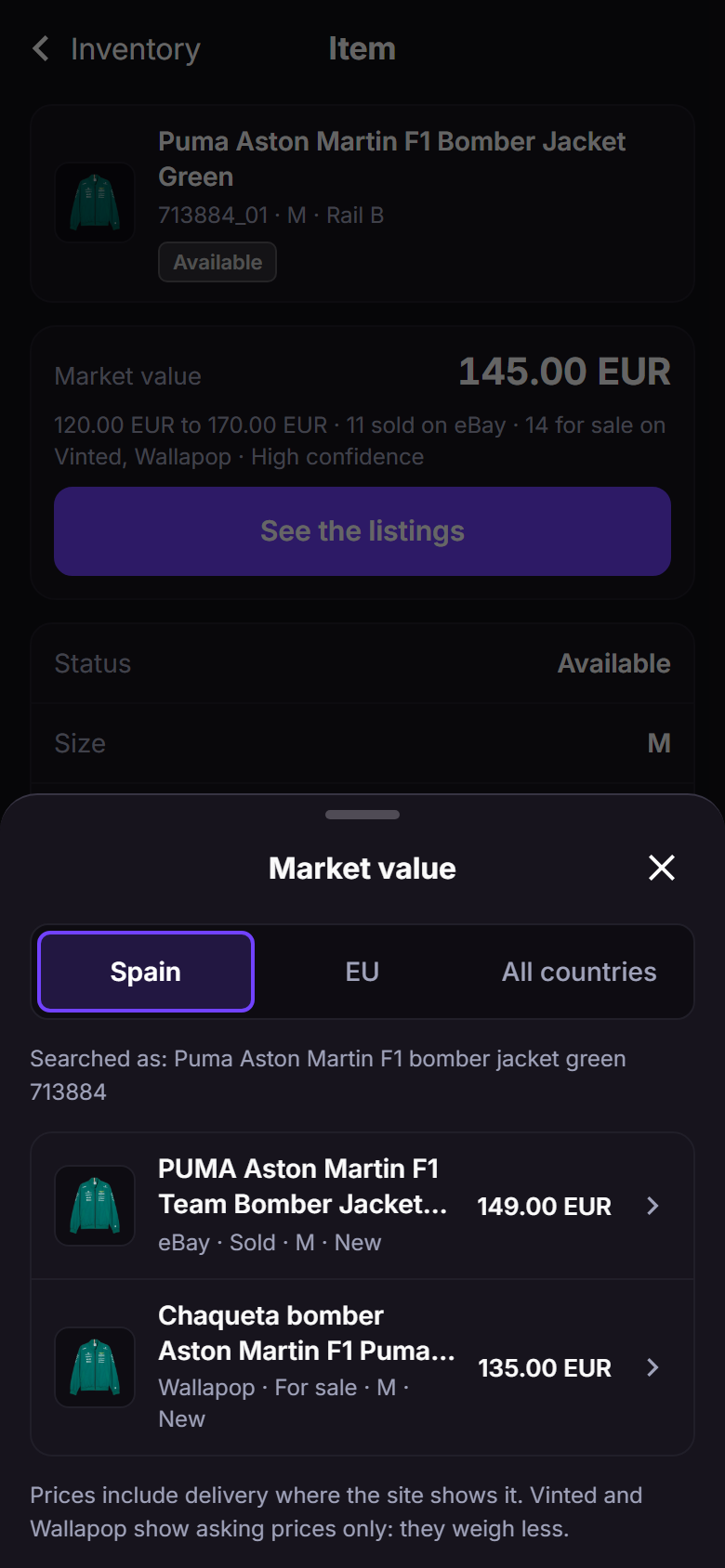
See the listings: only the listings that count. Sample data.