 RestocksAIO Docs
Product Types
Each Inventory unit has a product type. The type decides what RestocksAIO asks: a size region, letter sizes, one size or a quantity, a box and a best-before date.
RestocksAIO keeps more than sneakers in Inventory. Each unit has a product type. The type decides which fields RestocksAIO asks for when you add the unit, and which sites can list it.
Product types need the desktop app version of 16 November 2026 or later. A unit that you made before has the type Sneakers, or Cards for a trading card.
The types
| Type | What RestocksAIO asks | Box picker |
|---|---|---|
| Sneakers | A size region (US, EU or UK) and a size from the size table of the brand. | Yes |
| Clothing | Letter sizes (XXS to 4XL, or One size), or any size as text, for example W32 L34. | No |
| Accessories | One size, or a size as text. | No |
| Collectibles | A quantity. No size. | Yes |
| Cards | Nothing here: trading cards use the Cards tab. | No |
| Electronics | A quantity. No size. | No |
| Food and pet | A quantity, and an optional Best before date. | No |
| Other | A quantity. The name is enough. | No |
Only Sneakers has a size region. A clothing size stays as you typed it: "M", not "US M". A type without sizes stores the size as ONE SIZE.
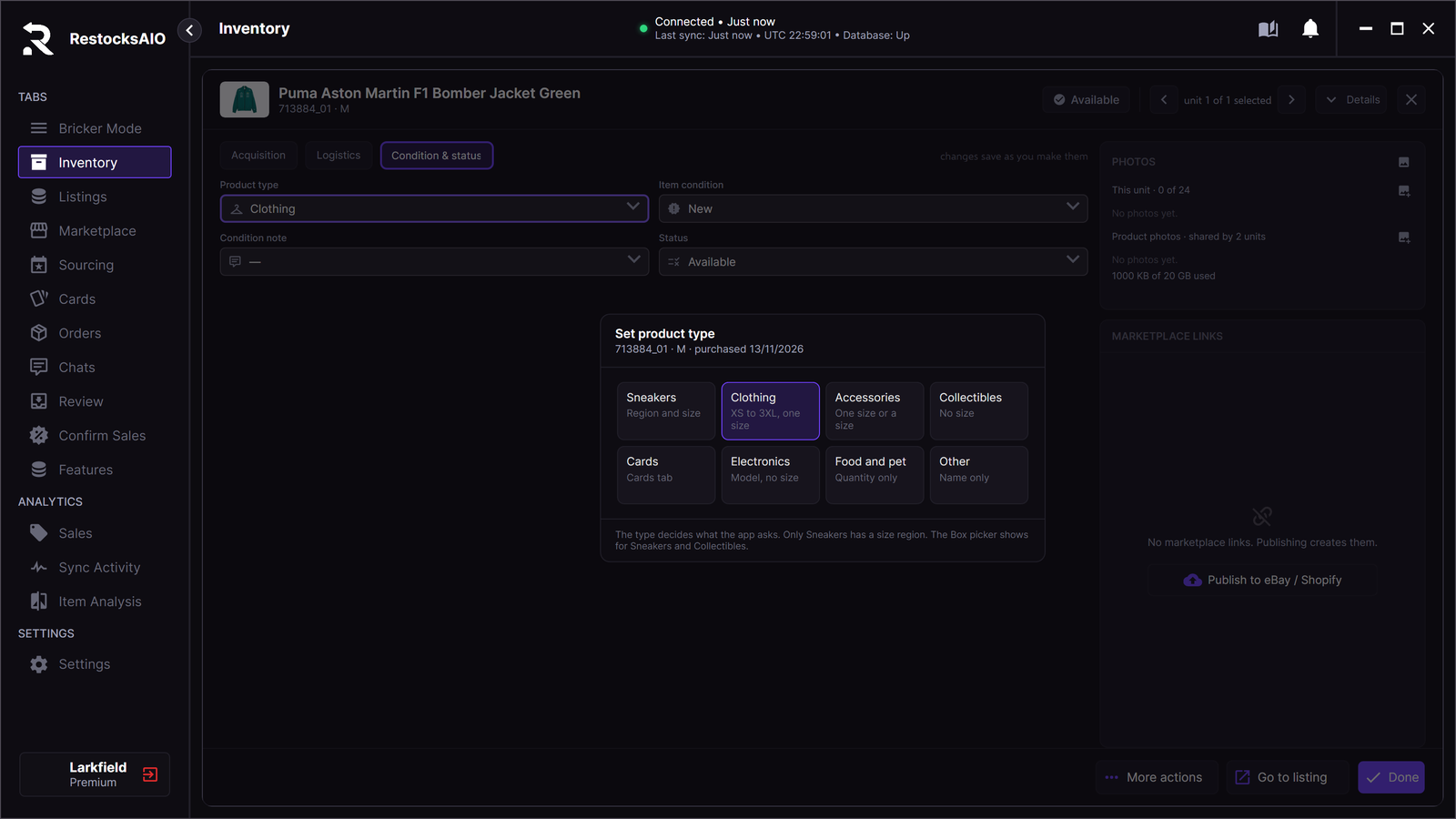
The type picker in Unit Detail. The current type is purple.
Where each type can sell
| Channel | Which units |
|---|---|
| eBay, Shopify, Vinted and Wallapop | Every type. |
| StockX, Alias, GOAT, Klekt and the other resale sites | Catalogue products only: a real style code and a size of the catalogue size table. Food and pet and Other never list there. |
A product outside the catalogue has no style code of the resale sites. RestocksAIO gives it a SKU of its own, for example RA-PUMAASTONMA-7KQ2. This SKU stays in your Inventory. RestocksAIO never sends it to a site as a style code, never puts it in a title and never uses it for a price search. Searches use the product name instead.
How a unit gets its type
- Find Product sets the type from the catalogue category or from the shop page, for example Food and pet for cat treats. Check it and change it before you create the product.
- Import Photos has a type picker on each group.
- The phone app sets the type in Find a product and Import photos. See Phone App.
- The Inventory CSV export has a ProductType column. A CSV without this column still imports.
Change the type of a unit
- Open the unit in Inventory (Unit Detail).
- Open the tab Condition & status.
- Click Product type. The picker Set product type opens.
- Click the type. RestocksAIO saves it at once, like every other field of the unit.
The Packaging (Box) field shows only for Sneakers and Collectibles. When you change the type, the field shows or hides at once. If the save fails, the field goes back to the old type.
Stats and prices
- Inventory stats keep the sizes of a product apart: S, M, L and ONE SIZE are separate rows.
- A unit without a SKU is grouped by its name.
- A product outside the catalogue has no StockX or Alias price. RestocksAIO does not count it as a price-check error or as a missing price. Use Market Value for these products.