 RestocksAIO Docs
Unit Detail
Unit Detail shows one Inventory unit. The Product tab edits the name, the SKU, the size, the best-before date, the source link and your price. Duplicate opens the copy.
Unit Detail shows one unit of your Inventory. You can change every field that you set when you added the unit.
The Product tab needs a desktop app version later than 0.4.41.77.
Open a unit
- Double-click a row in Inventory, or select it and press Enter.
- The arrows at the top go to the previous or the next selected unit, for example "unit 1 of 3 selected".
The header shows the photo, the name, the SKU and the size. When you added the product from a link, the header also shows the link, for example Open on Amazon. The link opens the product page.
The tabs
| Tab | Fields |
|---|---|
| Product | Product name, SKU, size, size region, best before, source link and your price. |
| Acquisition | Purchase price, currency, VAT, purchase date, order number, purchase site and billed. |
| Logistics | Location, tracking and group. |
| Condition & status | Product type, item condition, box (Sneakers and Collectibles), condition note and status. |
Changes save as you make them. You do not click a Save button.
The Product tab
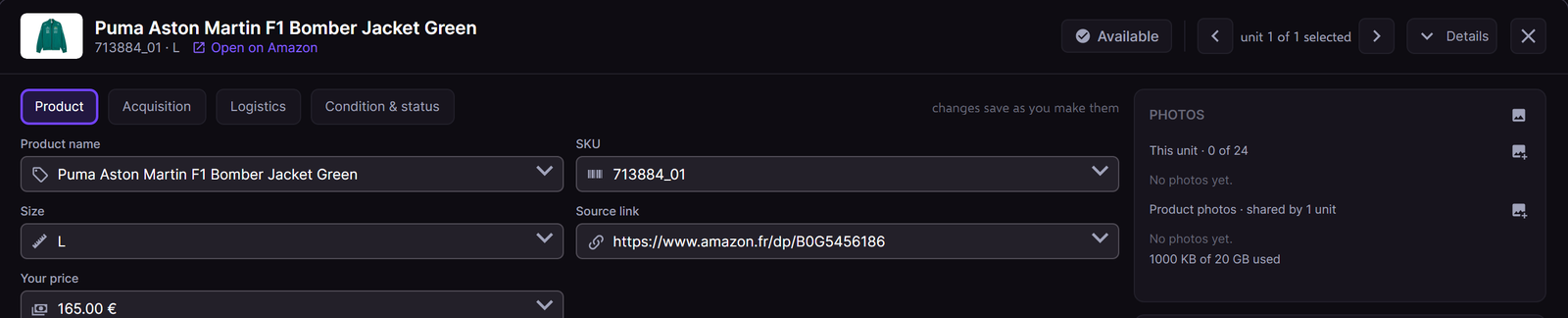
The Product tab of a jacket. Sample data.
| Field | What it does |
|---|---|
| Product name | The name of the unit. New listings use the new name. |
| SKU | The SKU of the unit. An empty SKU gets a new SKU that RestocksAIO makes. |
| Size | The size. Click a size chip, or type another size in Other. |
| Size region | US, EU or UK. Only Sneakers has it. |
| Best before | The best-before date. Only Food and pet has it. |
| Source link | The page that you added the product from. The header opens an https link. |
| Your price | Your own asking price. The Market value panel compares it with the market. |
The fields follow the product type. A type without sizes shows no Size field.
A unit with live listings
You can change a unit that is listed. RestocksAIO never refuses the change. The hint under the field says what happens to the listings, for example:
- Size: "This unit has 1 live listing. It keeps the old size. End and publish again to sell the new size."
- SKU: "This unit has 1 live listing. It keeps the old SKU. Price checks, product photos and new listings use the new SKU."
- Name: "This unit has 1 live listing. It keeps its title. New listings use the new name."
A sneaker size that is not in the size table of the brand stays as text. The hint says: "Not a size of the catalogue table. eBay, Shopify, Vinted and Wallapop list it; resale sites need a catalogue size."
The type suggestion
When the product page of the unit names another type, the Product type field in Condition & status shows a hint, for example "The product page says Clothing.", and the link Use it. One click sets the type. The type never changes by itself.
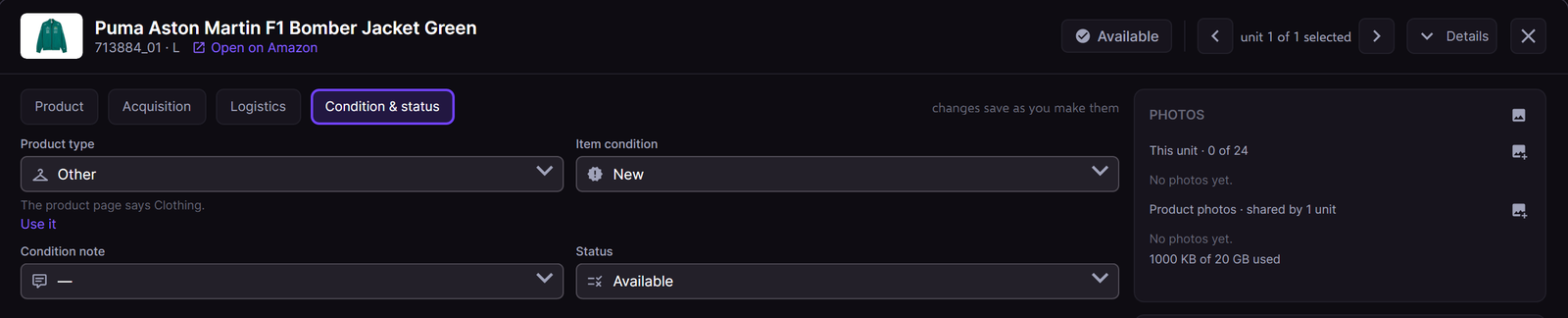
The type suggestion. Sample data.
A unit with a source link and no saved page facts reads its page one time in the background, at most one time a day for each link. This happens when the Publish Composer, Unit Detail or Market value opens the unit. Nothing waits for the read.
Duplicate a unit
- Right-click a row in Inventory and choose Duplicate.
- RestocksAIO makes the copy and opens Unit Detail on the copy, on the Product tab. The note says "Made 1 copy. Change its size or other fields here."
- Change the size or another field of the copy.
The copy has no photos of its own. The photos of the original unit stay with the original unit.
Input is safe
A click outside a field editor, a click on the backdrop or Escape keeps a half-typed value. An editor that you did not change still closes on them.