 RestocksAIO Docs
Price sync
Price sync sets your Shopify and eBay prices from StockX, your other store or your cost, with your markup and rounding. Preview, then activate.
Price sync sets your Shopify and eBay prices from a price you choose: the StockX buy cost, a StockX ask, your other store or your own cost. You add your markup and rounding. You preview every price, then you activate the rule.
Price sync is the feature. One line in it is a rule. A rule writes nothing until you click Activate rule.
Price sync is included in Premium.
Price sync is for eBay and Shopify only. Bricker Mode prices your listings on StockX, Alias and the other resale marketplaces.
RestocksAIO never buys for you. A rule only changes the sale price of a size on your store. It can also make an on-demand size sold out on Shopify when the size has no source.
Open Price sync
- Open the Marketplace tab.
- Click Price sync in the toolbar.
The window has the Rules list on the left and the selected rule on the right.
The Set up view of a rule. The Example under the form follows every edit.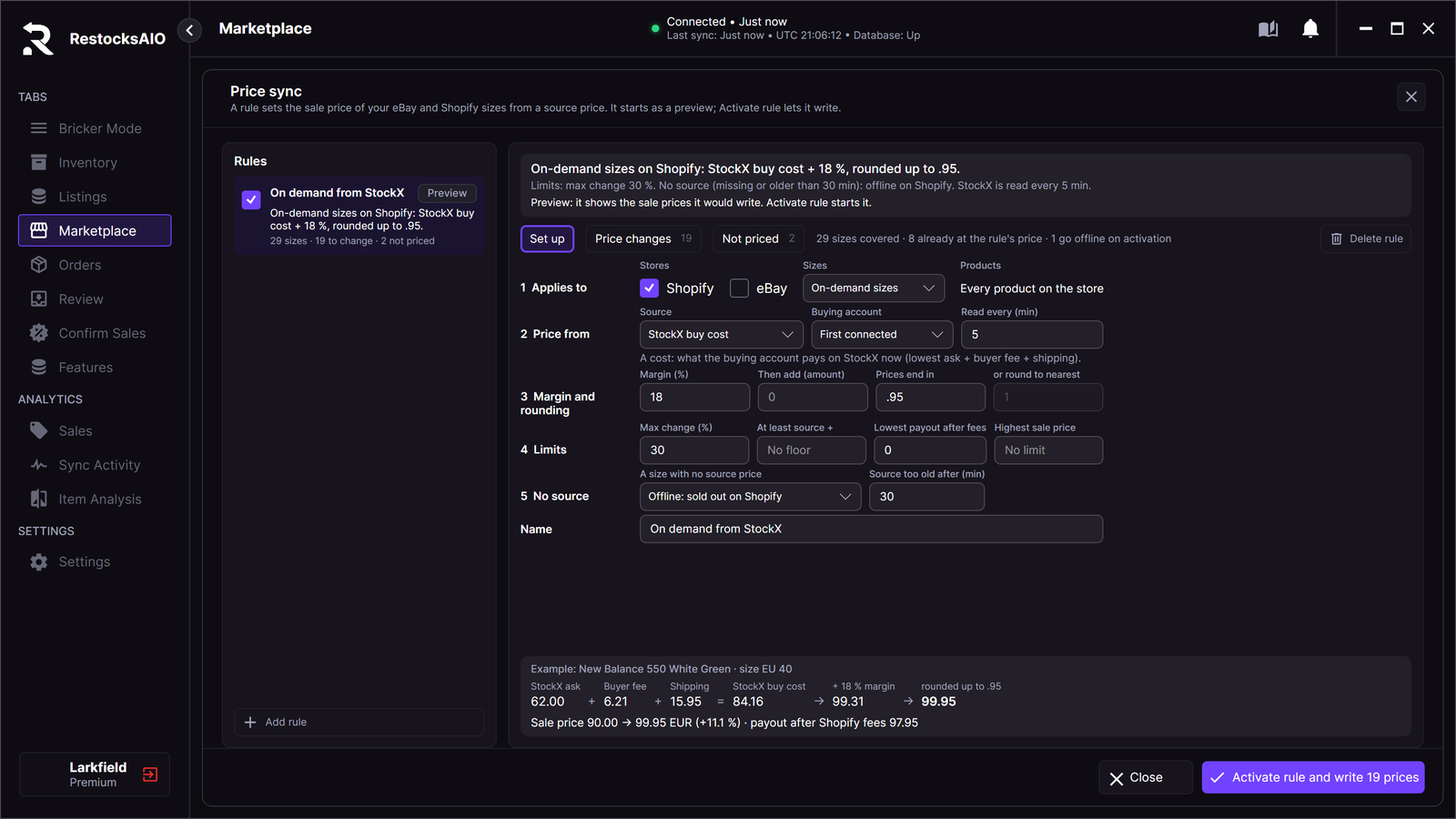
On-demand sizes on Shopify: StockX buy cost + 18 %, rounded up to .95.
Under the sentence, the list shows how many sizes the rule covers, how many prices change, and how many sizes are not priced.
Add a rule
- Click Add rule. To make a rule for some sizes only, tick those sizes in the Marketplace tab first. Then click Add rule for the N selected sizes.
- Fill in the five numbered sections of Set up.
- Read the Example under the form. It works one real size of your store through the rule and follows every edit.
- Open Price changes and Not priced to check the result.
- Click Activate rule when the preview is right.
A new rule starts as Undercut StockX on Shopify: StockX lowest ask, minus 1.00, rounded to the nearest 1, in the Preview state.
The Set up form
1 Applies to
| Field | What it does |
|---|---|
| Stores | Tick Shopify, eBay or both. A rule covers every connected account of the ticked store type. eBay can be ticked only when every connected eBay account is on one of these eBay sites: US, UK, Germany, Spain, France or Italy. RestocksAIO has a fee table for these six sites. |
| Sizes | All sizes, On-demand sizes or In-stock sizes. See On-demand sizes. |
| Products | Read only. Every product on the store, or the number of sizes and products you assigned. |
A size belongs to one rule at most. To put sizes on a rule later, tick them in the Marketplace tab and click Assign rule… in the selection bar. Clear price rule takes them off their rule.
2 Price from
Source has five options. A rule has one source. It does not fall back to another source.
| Source | What it is |
|---|---|
| StockX buy cost | A cost. What the buying account pays on StockX now: lowest ask + buyer fee + shipping. |
| My purchase cost | A cost. What you paid for your units of the product (average purchase cost). |
| StockX lowest ask | A sale price. The cheapest seller on StockX at your last price sync. It is not your cost. |
| StockX Flex lowest ask | A sale price. The cheapest Flex seller on StockX at your last price sync. It is not your cost. |
| Price on my other store | A sale price. What you ask for the same size on your other store (eBay for a Shopify listing, Shopify for an eBay listing). |
A StockX buy cost rule has two more fields:
- Buying account: the StockX account whose buyer fee and shipping make up the buy cost. First connected uses your first enabled StockX account.
- Read every (min): how often RestocksAIO reads the StockX price of each product. The default is 5 minutes.
When you pick StockX buy cost, the form also presets three values. You can change each one.
- Max change (%): 30
- Source too old after (min): 30
- A size with no source price: Offline: sold out on Shopify
3 Margin and rounding
| Field | What it does |
|---|---|
| Margin (%) | Your markup in percent. It adds a percentage of the source and is applied first. |
| Then add (amount) | Adds one fixed amount in the currency of the listing. 10 adds 10.00. -1 takes 1.00 off. Empty adds nothing. |
| Prices end in | For example .95. Every sale price ends in .95 and is rounded up, so the margin is kept. |
| or round to nearest | Rounds to the nearest multiple, for example 1 or 5. It is off while Prices end in is set. |
4 Limits
| Field | What it does |
|---|---|
| Max change (%) | A new sale price further than this from the current price is Blocked and not written. |
| At least source + | A sale price under the source plus this amount is raised to it. |
| Lowest payout after fees | A sale price whose payout after the store fees is under this amount is Blocked. |
| Highest sale price | A sale price over this amount is Blocked. |
A rule has no limit until you set one. A rule can lower a price. Set Lowest payout after fees or At least source + before you activate a rule that follows a market price.
5 No source
A size with no source price decides what the rule does when the source is missing or too old:
- Keep its sale price: the size keeps its price and is listed under Not priced as No source.
- Offline: sold out on Shopify (StockX buy cost rules only): an active rule makes the on-demand size sold out on your Shopify store. The product and its other sizes stay up. The size goes back on sale when the source returns or when you untick the rule.
- Price from the last source read: the rule keeps the last source price it read.
Source too old after (min) sets when a source counts as too old. Empty means 24 hours.
Name is the label of the rule in the list.
Worked example
This is a StockX buy cost rule with Margin (%) 18 and Prices end in .95. All amounts are in EUR.
| Step | Amount |
|---|---|
| StockX ask | 62.00 |
| + Buyer fee | 6.21 |
| + Shipping | 15.95 |
| = StockX buy cost | 84.16 |
| + 18 % margin | 99.31 |
| Rounded up to .95 | 99.95 |
If the size is on your store at 90.00, the rule changes it to 99.95 (+11.1 %). The Price changes row shows 62.00 + 6.21 + 15.95 under the buy cost. It shows the payout after the store fees under the new sale price.
With Max change (%) 30, the same rule does not write a size that is on the store at 60.00. That change is over 30 %, so the size reads Blocked.
The buyer fee and shipping come from the StockX account you buy with. They are not fixed numbers. Your amounts can differ from this example.
Preview, then activate
A rule in Preview writes nothing.
- Open Price changes. The columns are Item, Size, Sale price now, the source, New sale price and Change.
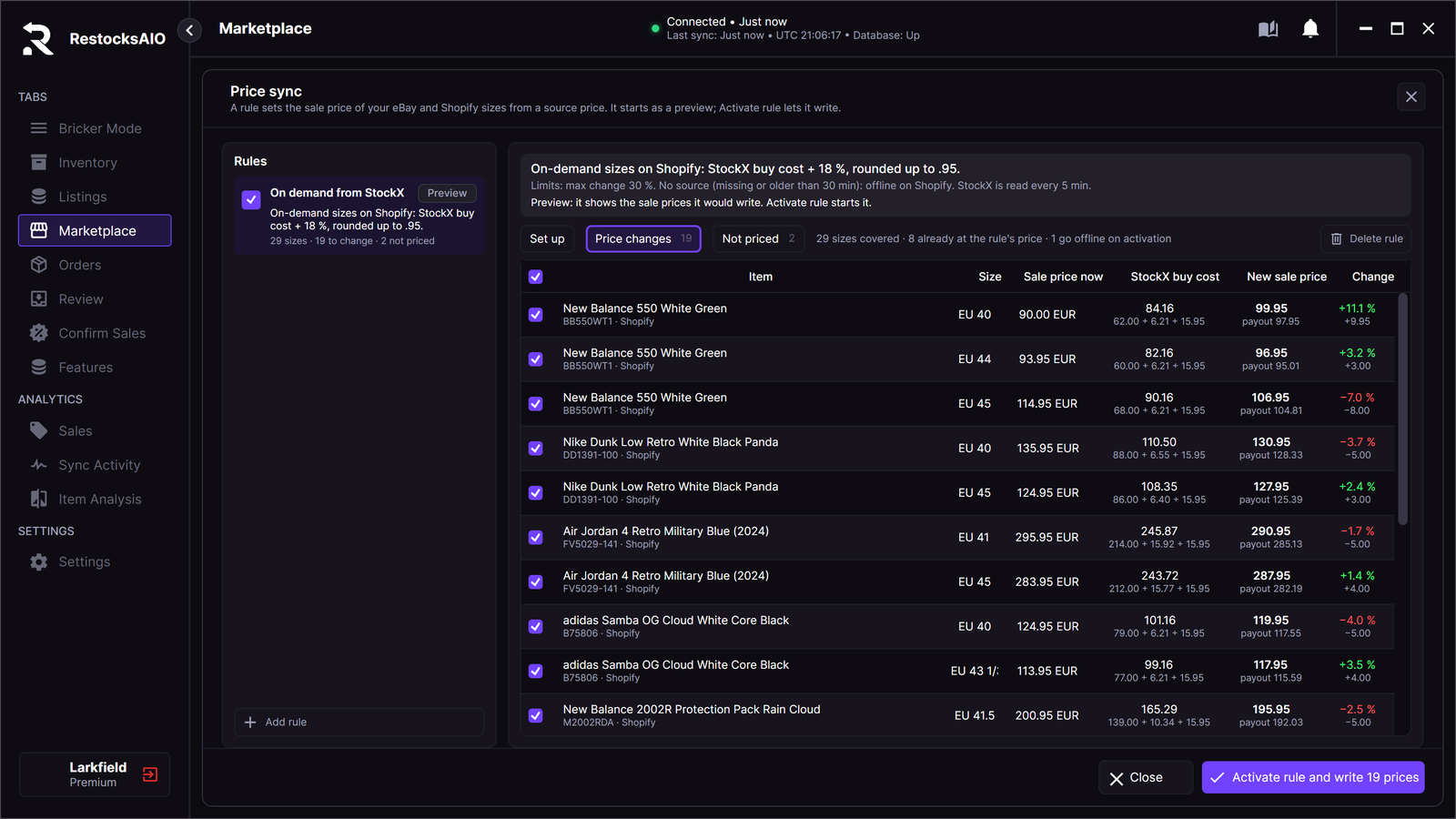
Price changes lists only the sizes whose price would change.
- Untick a row to leave that size out of this write.
- Click Activate rule and write N prices.
- Read the confirmation. It states the rule, the number of sale prices and the total change. It also states how many on-demand sizes go offline.
- Click Activate rule.
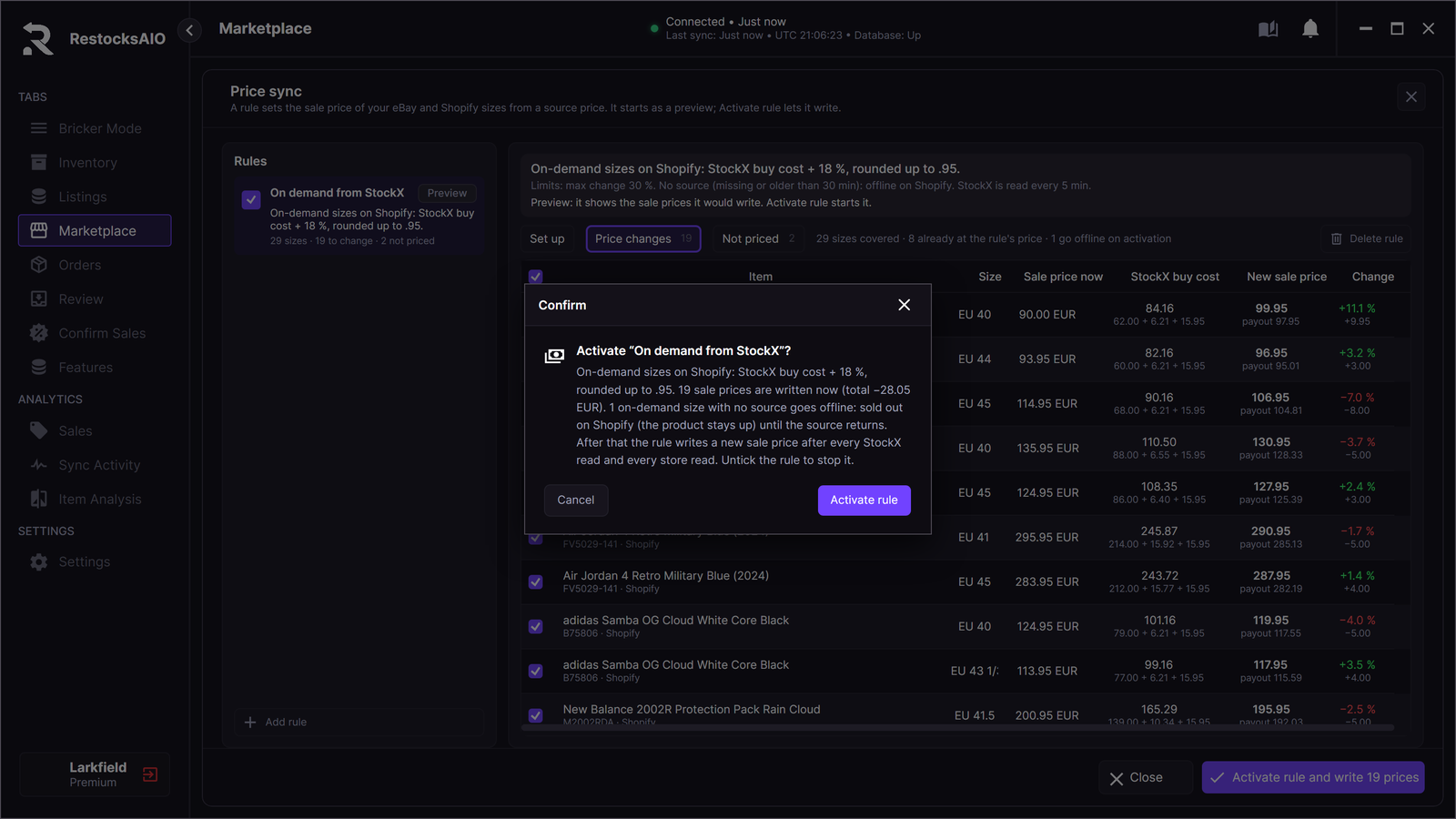
The confirmation states the rule, the number of sale prices, the total change and the sizes that go offline.
After activation the rule writes a new sale price after every store read. A StockX buy cost rule also writes after every StockX read, when the price moves by 0.50 or more. Every write shows in Sync Activity.
To stop a rule, untick it in the Rules list.
What the state words mean
| Word | Where | Meaning |
|---|---|---|
| Preview | Rule | The rule shows the sale prices it would write. It writes none. |
| Active | Rule | The rule writes a new sale price after every store read. |
| Held | Rule, size | You changed the sale price of a size outside the rule. The rule leaves that size until you click Resume. It still prices its other sizes. |
| Off | Rule | The rule is unticked. It prices nothing. |
| No source | Size | The source price of the size is missing or too old. |
| Offline | Size | The rule made the size sold out on Shopify because it has no source. |
| Blocked | Size | A limit of the rule, or a fact the rule needs, stops the price. |
Held after a manual edit
When you change a price by hand, in RestocksAIO or in the store admin, the rule does not overwrite it. The size reads Held.
- Open the rule and click Not priced.
- Find the size. The Why column shows the manual change.
- Click Resume. The rule prices the size again from its current sale price.
Delete a rule
Click Delete rule. The listings keep the prices they have now.
A rule that took on-demand sizes offline cannot be deleted. Untick the rule first. The sizes go back on sale after the next store read. Then delete the rule.