 RestocksAIO Docs
Review and Sync Activity
Review holds every eBay and Shopify item that needs your decision. Sync Activity shows each write to a store and the health of each account.
Review is the inbox for everything that needs a human decision. Examples are a sale with no unit behind it, a refund, and a quantity that does not match. Sync Activity is the journal of every operation RestocksAIO sent to eBay and Shopify, with the read health of each account.
Review
Open Review in the sidebar. The badge shows the number of items that wait.
- Needs a decision lists the open items. Resolved lists the closed items.
- The first filter narrows by kind: All kinds, Order lines, Refunds & cancellations, Quantity conflicts, Reconciliation, Listing violations.
- The second filter narrows by account.
- Evidence on a card shows the facts behind it: the order, the price, the time.
- Open product shows the product in the Marketplace tab.
Cards and their actions
| Card | What happened | Actions |
|---|---|---|
| Order line has no offer we recognise | A store sold a listing that is not linked to a unit. RestocksAIO cannot tell which unit left the warehouse. | Link to a unit… opens Linking. After you link, the sale takes that unit out of Inventory and lowers the other stores. Record sale without stock creates a Sales record with no purchase cost. Nothing leaves Inventory. |
| Sold on demand — buy the pair | A Shopify store sold an on-demand size. | Open source, Mark bought, Cancel order. See On-demand sizes. |
| Allocation exhausted — sold more than we hold | A store sold more units than the offer holds. | Add stock… opens Add Item. |
| One order line matches more than one listing | Two listings match the same order line. | Link to a unit… |
| Order refunded or cancelled — the unit was not returned to Inventory | The store refunded or cancelled an order after the unit left Inventory. | Recreate unit… creates a new unit with the original cost and VAT. You choose its condition, packaging and location. |
| The store holds more than our stock can back | The quantity on the store is higher than your linked units. | Accept remote quantity accepts the quantity the store has. When the button reads Accept remote · release N units, those units go back to Available. Re-send ours writes the linked-unit quantity to the store again. |
| A listing has no Inventory pair behind it | A store listing matches a unit in Inventory, and the two are not linked. | Link to a unit… |
| The store flagged a listing as non-compliant | RestocksAIO does not read listing problems from eBay or Shopify yet, so this card does not appear now. | Open in marketplace opens the listing on the store. |
| The draft did not go live | A store refused a Go live. The card shows the reason of the store. | Open in marketplace |
| Sold elsewhere — the (marketplace) listing is still live | The pair sold, and its listing on another marketplace is still live. The kind reads Sold elsewhere, still listed. This happens when the marketplace refused the delete, when the removal after a store order is off, or when several listings match the sold pair and none is linked to it. | Retry deletion asks the marketplace to delete that listing again. Dismiss… closes the row and changes nothing on the marketplace. With several matches, delete the right listing in Listings first. |
Most cards also have Dismiss…. Choose a Reason: Handled outside the app, Provider error, no action needed, Duplicate of another item, Stock written off or Other — see note. A quantity conflict cannot be dismissed. It needs one of its two actions.
After an eBay or Shopify order, the Bricker Mode tasks of the pair delete its listings on the resale marketplaces. By default, a listing without a Bricker task stays live and shows in Review. The rules and the two settings are in When a pair sells on eBay or Shopify.
A sale stays in Review until it has a unit or a decision. Check Review each day that you sell on eBay or Shopify.
Marketplace problems
At each start, RestocksAIO checks the saved eBay, Shopify, Vinted and Wallapop records against Inventory. A record that stays broken is a Marketplace problem row at the top of Review.
Each row shows:
- a plain title, for example "An eBay listing counts 1 pair no longer in Inventory".
- what the fix will do.
- the items that the problem names.
- one Fix button.
While a problem remains, the banner reads "Marketplace sync is paused: fix N marketplace problems in Review. Other items can still be edited."
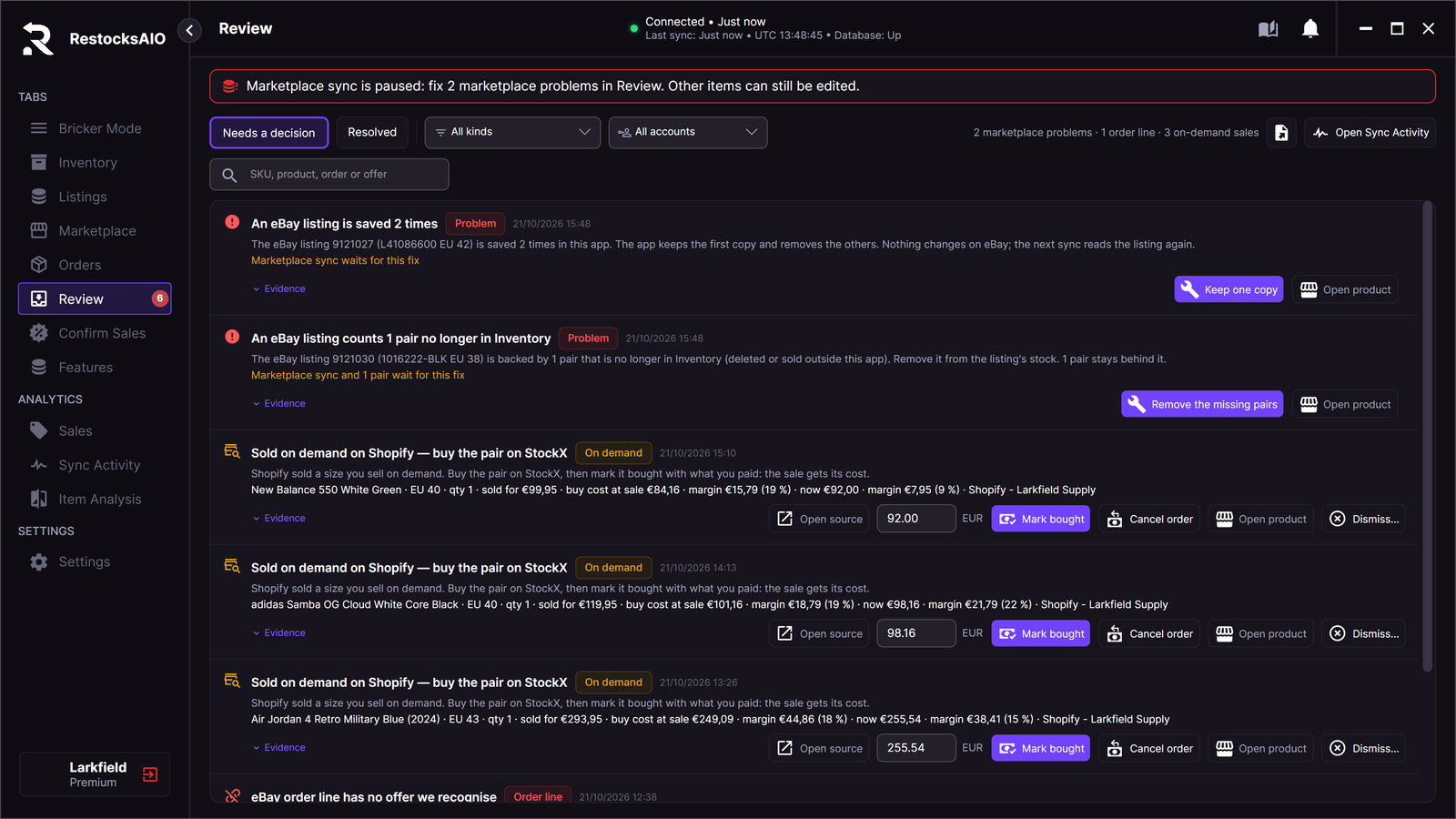
Marketplace problems at the top of Review, each with its Fix button.
- Marketplace writes and order intake wait.
- Inventory changes still work for every item that no problem names: move, condition, duplicate, sold, refunded, and delete with the listings kept.
- An item that a problem names tells you which problem to fix first.
Fix a problem
Click the Fix button of the row. RestocksAIO saves the fix first, then applies it. After the last fix, sync starts again. You do not have to restart the app.
| Problem | Fix button | What it does |
|---|---|---|
| A listing is saved more than one time. | Keep one copy | Keeps the first copy. The next sync reads the listing again. |
| A saved listing is incomplete. | Remove the broken record | Removes the record that has no full account or listing number. |
| The pairs behind a listing are saved more than one time. | Keep the first list | Keeps the first list. Check the quantity on the site. |
| A stock record names no listing or no pair. | Remove the broken record | Removes the record. |
| A listing counts pairs that are no longer in Inventory. | Remove the missing pairs | Removes those pairs from the listing's stock in RestocksAIO. When no pair is left, end the listing on the site or link another pair to it. |
| A stock record is still flagged, but every pair is back. | Clear the flag | Clears the flag. |
| A marketplace change is recorded two times, or has no id. | Keep one copy or Remove the broken record | Keeps the first record, or removes the record without an id. |
A fix changes only the records in RestocksAIO. It never sends anything to a marketplace. A problem row has no Dismiss button, because sync would stay paused.
If a fix cannot be saved, nothing changes. Try again. If it fails again, restart the app.
A deleted or sold unit in finished marketplace history is not a problem. In versions 0.4.41.15 to 0.4.41.34, such a unit could stop every write with "Marketplace recovery state contains identity conflicts; reconcile before writes". The update releases these accounts by itself.
Sync Activity
Open Sync Activity in the sidebar, or click Open Sync Activity in Review.
Accounts and poll health
The left side lists each eBay and Shopify account with its Last success, Next attempt and token state.
| State | Meaning | Action |
|---|---|---|
| Scheduled | The account is read on its schedule. | Poll now reads it immediately. |
| Polling now | A read is in progress. | Wait. |
| Needs re-login | The authorization expired. The account is not read. | Reconnect… |
Operations
The journal lists every operation, newest first.
- Kind: Publish, Price, Quantity, Withdraw or Order walk.
- State: Verified, Failed — retryable, Failed — terminal or Running.
- Range: Last 24 hours, Last 7 days or Last 30 days.
Verified means RestocksAIO read the listing back from the store and it matches what was sent.
Each row has these actions:
| Action | What it does |
|---|---|
| Artifacts | Shows what was sent and what the store answered. |
| Retry | Reads the listing again and sends only the difference. RestocksAIO never retries a failed write automatically. A terminal failure cannot be retried, and the row says why. |
| Open in Linking / Open in Review / Open listing | Opens the item the operation is about. |
A Price sync write also shows here. The state line of an active rule reads, for example, Last write 9 Oct 14:30: 12 prices written, 1 failed (see Sync Activity).