 RestocksAIO Docs
Copy to Accounts
Copy one listing to several accounts of the same site, each with its own photos, price and start time. The copies are linked: one sale ends the others.
Copy to accounts publishes one listing again on your other accounts of the same site. Each account gets its own photos, price and start time. The copies are linked: when one sells, RestocksAIO ends the others.
Example: you sell clothes on three Vinted accounts. You list a hoodie on the first account. Copy to accounts puts it on the other two, each with other photos.
Copy to accounts is part of the store channels in Premium: Vinted, Wallapop, eBay and Shopify. It is in the macOS app and the new Windows app, from version 0.4.41.66. The other accounts must be connected in Settings → Accounts.
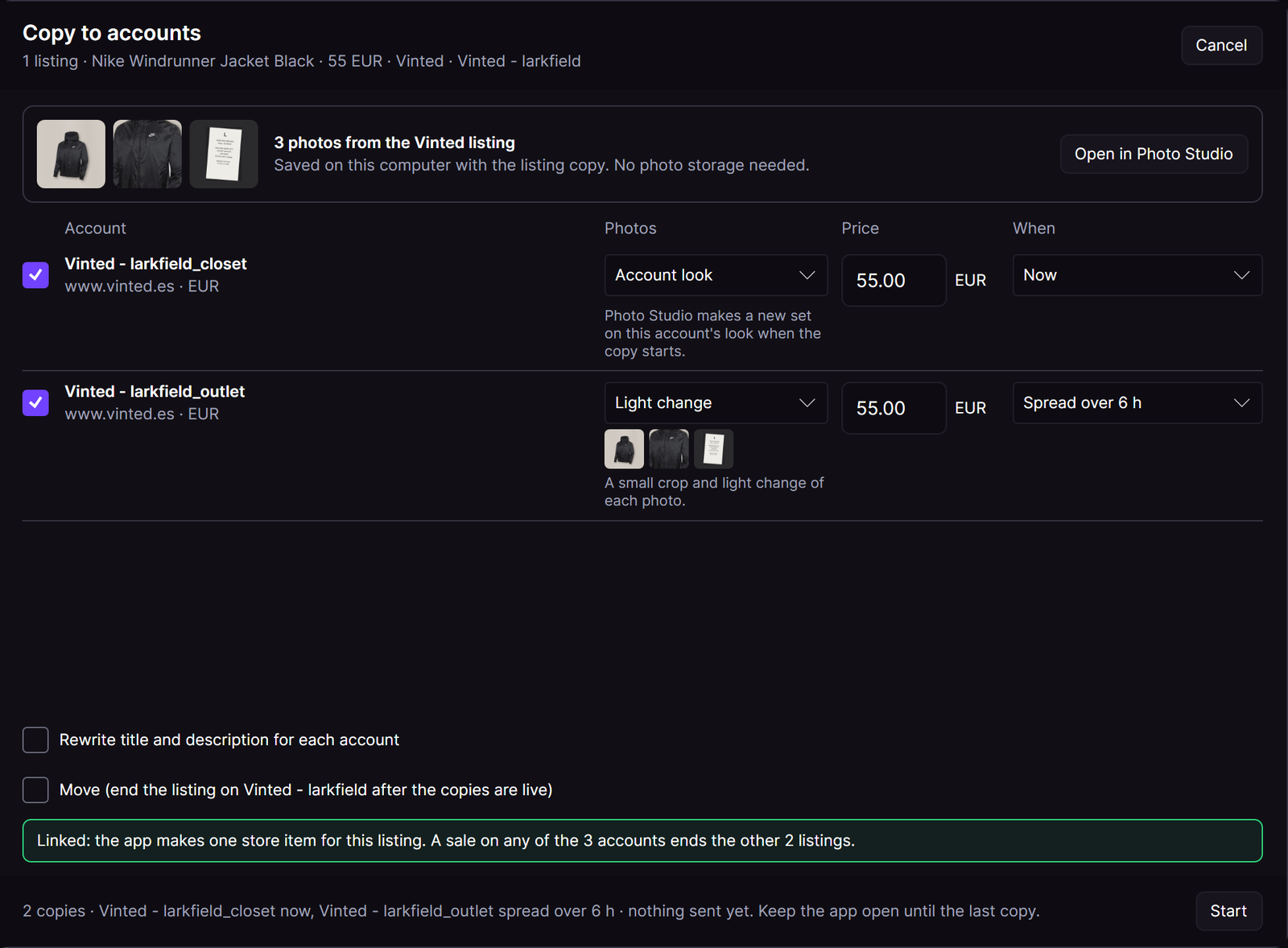
One jacket from the first Vinted account to two other accounts. Sample accounts.
Copy a listing
- Open the Marketplace tab.
- Right-click a live listing, or tick several listings of one site and open the row menu.
- Open More, then click Copy to accounts….
- Tick each account that gets a copy. An account that already has the item starts unticked.
- For each account, choose the Photos, the Price and When.
- Click Start.
The original listing stays live. To end it after the copies, tick Move. See Move.
The source photos
The strip at the top shows the photos of the listing. RestocksAIO keeps them on your computer with its copy of the listing. You need no photo storage. When RestocksAIO has no copy yet, it reads the listing and saves its photos when the copy starts.
Open in Photo Studio opens Photo Studio for this listing.
Photos
| Choice | What the copy sends |
|---|---|
| Same photos | The listing photos as they are. |
| Light change | A small crop and light change of each photo. |
| Account look | A new set on the look of this account. Photo Studio makes it when the copy starts. |
| Pick in Photo Studio… | The set that you saved in Photo Studio for this account. |
Each row starts with the look of its account. An account without a look starts with Light change.
eBay and Shopify copies keep the listing photos.
Price
Each row shows the price of the listing. Type another price for one account if you want one. The price must be above 0.
When an account sells in another currency, the row converts the price with the currency rates of the app (ECB). The line under the price shows the conversion. Tick I checked the N converted prices. Start stays off until you tick it.
When
| Choice | When the copy starts |
|---|---|
| Now | At once, one after the other. |
| In 1 h | One hour after you click Start. |
| Spread over 6 h | The copies with this choice start at equal steps over the next 6 hours. |
| At a time | At the time that you type, as HH:mm. When that time has passed today, the copy starts at that time tomorrow. |
RestocksAIO waits 20 to 60 seconds after each copy, also between two listings.
A copy that waits needs the app. Keep the app open until the last copy. When you close the app, the copies that did not start are not sent.
Options
- Rewrite title and description for each account: the AI listing copy writes a new title and description for each account. When the rewrite fails for one account, that account gets no copy. The option is off when AI listing copy is not available for the account.
- Move: see Move.
The green note tells you how the copies are linked. "Linked: the app makes one store item for this listing" means that the listing has no Inventory item yet. RestocksAIO then makes one store item before the first copy. All copies hold that item. See Linked copies.
Move
Tick Move (end the listing on … after the copies are live). RestocksAIO ends the original listing after the last copy. It ends it only when every copy went live. When a copy fails, the original listing stays live.
While the copies run
- The footer shows "In progress · N of M done. Keep the app open until the last copy."
- Each row shows its result and the time.
- Cancel becomes Stop the rest. It stops the copies that did not start. A copy that started runs to its end.
- At the end, the footer shows "Finished · N copied · N not: read the result of each one."
What it does not do
- It does not copy to another site, for example Vinted to Wallapop. Publish the item from Inventory instead.
- It does not copy a sold, reserved or ended listing.
- It does not count against the daily relist limit.